

Sources — Traffic Sources
The Sources section inside campaign settings is where you connect an advertising traffic source. Each Source has a type (Provider): Facebook, Google, Telegram , or Custom . The Provider determines whi
The Sources section inside campaign settings is where you connect an advertising traffic source. Each Source has a type (Provider): Facebook, Google,
Telegram, or Custom. The Provider determines which fields are required for setup and how Tracker sends events back to the ad account (S2S — server-to-server).A single campaign can contain multiple Sources — this is useful when traffic for an offer is running from several platforms in parallel. Each Source creates a separate launch link (you copy it and paste it into your ad account), but analytics are shared across the entire campaign. In Dashboards — Summary Analyticsand Analytics — detailed tableyou can segment by
source_name and see which channel delivers what.What tasks the section solves
Connect Facebook Ads with all its specifics: Pixel ID, Access Token, and event sending via Conversions API. Connect Google Ads with Conversion ID and Conversion labels. Launch traffic directly from
Telegram (via a channel invite link or a direct link to the bot). Run a test launch or a non-standard scenario (Custom). Separate sources within a single campaign to see in Dashboards / Analytics which channel performs best. Mixed attribution: a lead clicks an FB ad, then goes to a TG channel, then to DM — Tracker links the clickid across all stages.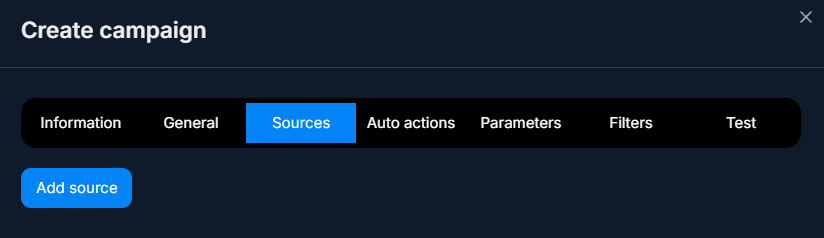
Video tutorial
What’s inside
Tracker supports 4 Provider types. Each one has a separate article with a detailed breakdown of fields and setup:


Provider | When to use | Specifics |
|---|---|---|
Facebook | You run traffic from Meta (Facebook, Instagram). | Pixel ID + Access Token + Mapping events. Tracker sends events to Conversions API. |
Google | Google Ads (search, display, YouTube Ads). | Conversion ID + Conversion labels. Auto redirect for the campaign route. |
Telegram | Launch traffic from Telegram itself (your own channel, another channel, or a direct link to the bot). | Internal invite link, without an external advertising platform. |
Custom | Tests, non-standard scenarios, or a source without a ready-made integration template. | No S2S sending. Universal, with no specific fields. |
Use cases by segment
Sources work the same way for any niche. Here are a few real-world scenarios to understand how to combine them:
- —Forex/crypto arbitrage: the main flow from Facebook (Pixel + CAPI), in parallel — a
Telegram“Signals” channel with an invite link and reposts to other channels. OneTrackeraccount sees both lead feeds under one campaign.
- —E-commerce: Google Ads (search traffic with specific intent) + Facebook (look-alike based on existing customers). Comparing conversion in Dashboards helps you understand which channel to use as the basis for scaling.
- —Support / SaaS: a
Customsource with UTM tags for a webinar landing page + Google Ads with search keywords. Leads go to oneTelegramchannel, butTrackerremembers where each one came from.
- —Info business: Facebook + Instagram (one FB Source, because there is one Pixel) +
Telegram(reposts in the expert’s personal channels). ACustomsource for placements with partners without an ad account.
How to add a Source
Universal sequence for any Provider:
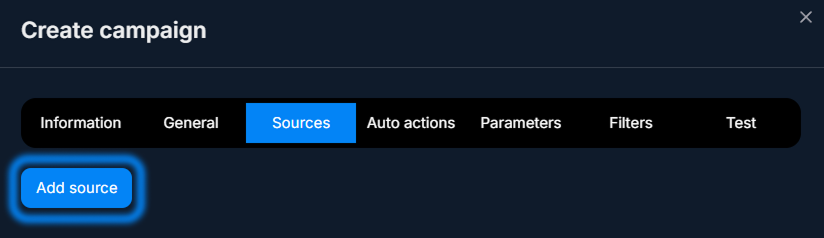
- 1. In the campaign, open the Sources tab.
- 2. Click Add source — the creation form will open.
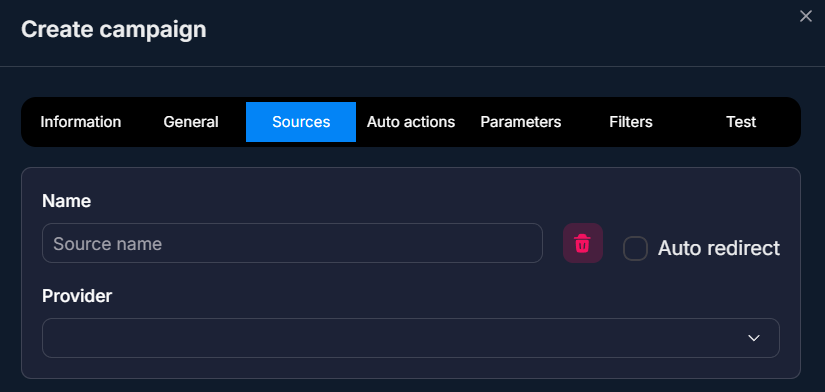
- 3. Fill in Name (the internal name for the team) and Provider.
- 4. Fill in the remaining fields — they depend on the Provider (see the corresponding article).
- 5. Save.
Trackerwill generate a Tracking link — this is what you will paste into the ad account.
Where to start
It depends on the platform you are sending traffic from:
- Facebook / Instagram — (Pixel ID and Access Token are required).
- Google Ads — (Conversion ID and labels are required).
Telegram(your own ads insideTelegram, placements in other channels) —.
- Test or non-standard source —.
- Which parameters to pass in the link URL —.
FAQ
Articles in this section
Related


Was this article helpful?