

Google — Source with Google Ads
A Source with Provider = Google is needed when you drive traffic from Google Ads (Search, Display, YouTube Ads). Tracker links your campaign events to Google Conversions using the Conversion ID and Co
A Source with Provider = Google is needed when you drive traffic from Google Ads (Search, Display, YouTube Ads). Tracker links your campaign events to Google Conversions using the
Conversion ID and Conversion labels, so the Google algorithm optimizes for target actions.When you need a Google Source
You run traffic through Google Ads (Search, Display, YouTube) and want the advertising algorithm to optimize for FD / registrations, not just clicks. You use Smart Bidding — strategies do not work without event transmission. You want to see conversions in the Google Ads interface and compare campaigns. You run performance marketing where Google and Facebook run in parallel and need comparable reports.
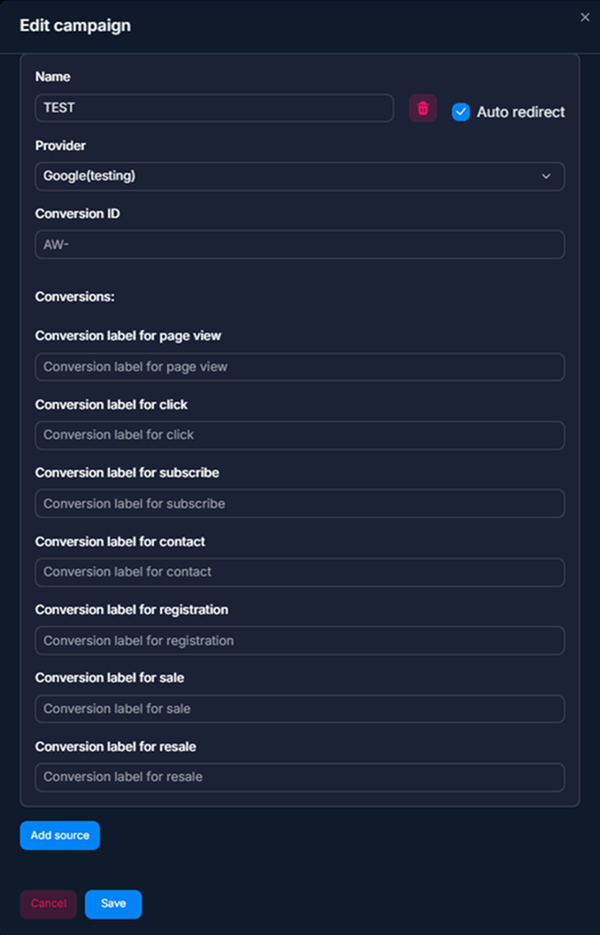
How it works
Each event has its own
Conversion label. For example, the Subscribe conversion in Google Ads has its own label, and Purchase has its own. In the Google Source settings, you define the mapping.
Setup steps
Create conversions in Google Ads
Go to Google Ads → Tools → Conversions. Create conversions for your target events: Subscribe (joining a channel), Lead (contact with a bot), Purchase (deposit). Each conversion will get its own Conversion ID + Conversion label.Create a Source in Tracker
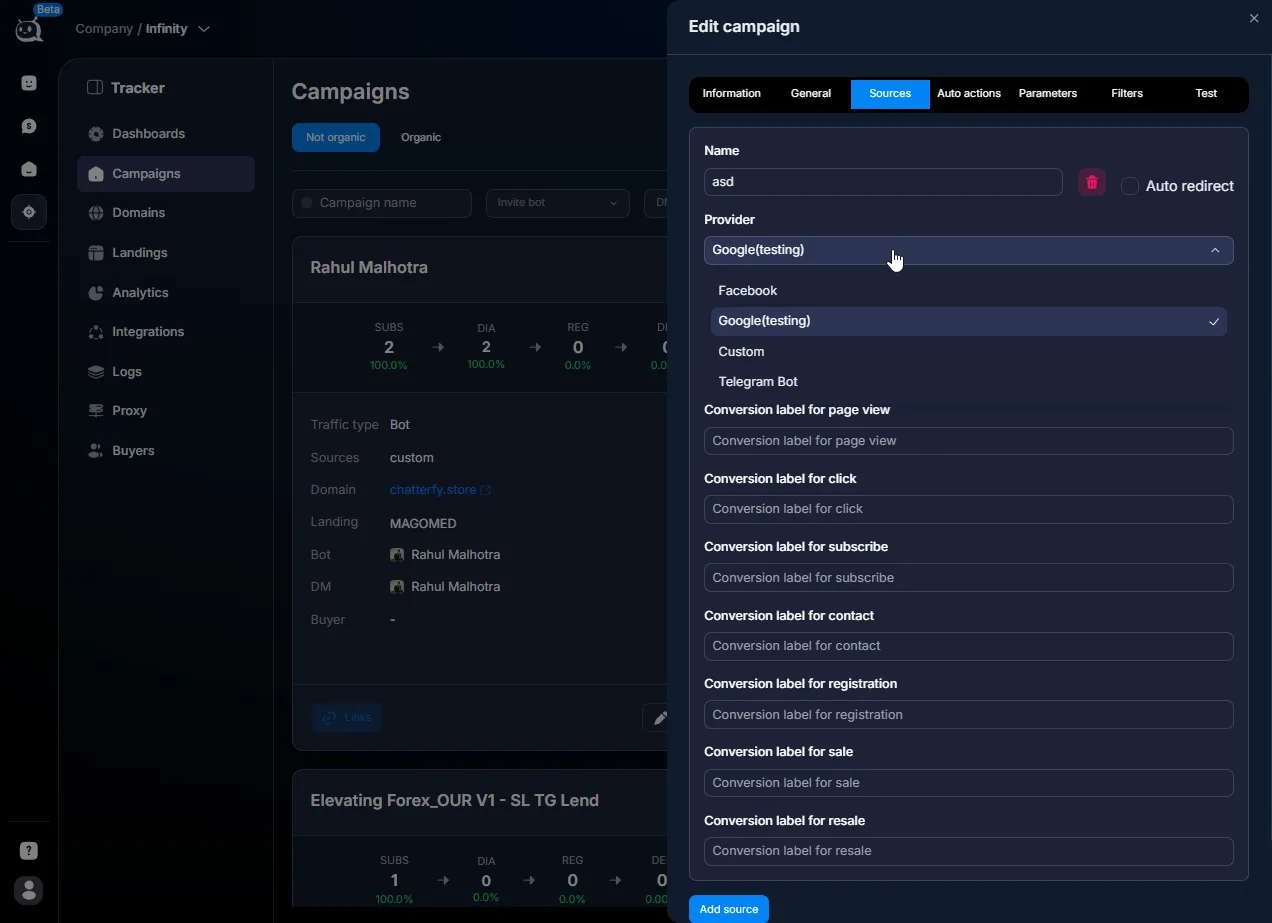
Fill in the Conversion ID
This is the Google Ads account identifier. It looks likeAW-123456789(with the AW- prefix). Get it in Google Ads from the conversion settings (the “Tag setup” field).Fill in the Conversion labels
Each event has its own label. For example, Subscribe →abcDEF12345, Purchase →xyz789ABC. Get the labels from the settings of each conversion in Google Ads.Enable Auto redirect (optional)
If you want the user to automatically follow the campaign route after clicking the Tracking link (without intermediate windows), enable it.Save and test
Save. Get the Tracking link and paste it into Google Ads (as the ad's Final URL). Make a test click and check the event delivery in “Logs — event log” Logs — журналы событий — Sources logs.
Source fields
Field | What it defines | Example |
|---|---|---|
Name | Internal source name. | Google-US-Forex |
Provider | Type. Select Google. | — |
Conversion ID | Google Ads account ID in the format AW-XXXXXXXXX. | AW-123456789 |
Conversion labels | List of mappings “Tracker event → label in Google”. Fill it in for the events you need. | subscribe → abcDEF12345 |
Auto redirect | Automatically redirect the user along the campaign route after the click. | on / off |
Event mapping
Which Tracker events make sense to send to Google:
Event | When to send | Conversion type in Google |
|---|---|---|
subscribe | Joining a channel / opening a bot. Usually the main target event for Top-of-Funnel campaigns. | Sign-up |
contact | The first message from a lead is a “qualified” lead. | Lead |
registration | Registration in the affiliate program (via postback). | Sign-up or Purchase, depending on the strategy |
sale | First deposit. The most valuable signal for Smart Bidding. | Purchase |
You don’t have to configure labels for all events — fill in only the ones you want to optimize your ads for. If your goal is “new leads,” you need subscribe and contact. If your goal is “revenue,” you need sale and resale.
Usage examples
Search campaign for Forex — arbitrage
A buyer drives search traffic to a Forex offer from Google Ads. They create two conversions in Google: Subscribe (joining the channel) and FD (first deposit). They fill in Tracker Source: Conversion ID
AW-987654321, Conversion labels: subscribe → label_sub, sale → label_fd. They configure Smart Bidding in Google for Maximize conversions, and optimization switches to FD.YouTube Ads with a Lead conversion — performance marketing
A B2B agency drives video traffic from YouTube Ads to a Telegram bot for lead collection. They create a Lead conversion in Google Ads. In Tracker: Conversion ID + label =
xyz_lead for the contact event. Every time a lead writes to the bot, Google receives a conversion and optimizes the video for the target audience.Parallel measurement with Facebook — performance marketing
A sales agency runs an offer in parallel from Facebook and Google Ads. In one campaign, there are two Sources: one Facebook and the other Google. Each receives its own conversions in its own ad account. In Dashboards Group By
source_name, you can see which channel delivers the best CPA.What’s important to consider
Conversion ID must start with
AW- — this is the Google Ads prefix. Without it, sending does not work. Conversion labels are long strings of letters and numbers and are easy to mix up. Copy them without spaces. After creating a conversion in Google Ads, saving the settings in Tracker and the actual appearance in Google Ads can take up to 24 hours. Do not expect it instantly. If you drive traffic in multiple countries, normally set Auto redirect = on so the user does not stay on the intermediate screen.Frequently asked questions
Related


Was this article helpful?