

Custom — Universal Source
Source with Provider = Custom is a universal type that is not tied to a specific advertising platform. Tracker creates a working Tracking link and collects everything on its side (Page View, Click, Su
Source with Provider = Custom is a universal type that is not tied to a specific advertising platform. Tracker creates a working Tracking link and collects everything on its side (Page View, Click, Subscribe, Contact), but does not send events back via the S2S API. It is suitable for tests, non-standard advertising platforms, and manual scenarios.
When to use Custom
You are testing a campaign before launch — Custom-Source gives you a working link without the need to connect a Pixel ID or Conversion ID. You are driving traffic from a platform that is not available as a ready-made Provider — Yandex Direct, MyTarget, TikTok Ads (if their API is not connected through a ready-made Provider), or seeding in third-party SMM channels. You are transferring traffic manually — sending the link to a client in direct messages or in an email campaign. You are running a promotion through an offline channel (a QR code in the office, at an event, or in print advertising).
How it works
The main difference is that there is no S2S sending. Tracker does not try to pass conversions to the advertising platform. This means:
- No entries are written to → Sources logs (there is nothing to send).
- The advertising platform does not receive the signal “this ad led to a conversion” — optimization works only by clicks, not by conversions.
- Analytics remains entirely inside Tracker (Dashboards / Analytics) and is not duplicated in Facebook Ads / Google Ads.

Setup steps
Create a Source
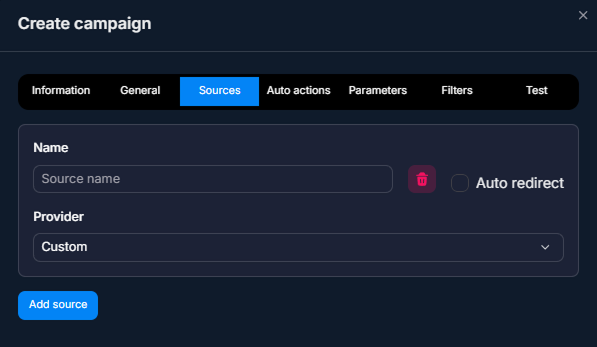
Fill in Name
Use a clear name — for example, “Test”, “Yandex”, or “QR office”.Enable Auto redirect (optional)
If you want the user to be automatically redirected along the campaign route.Save
Tracker will generate a Tracking link. This is a unique URL — copy it and use it wherever needed.Check via Test
Open Test — checking a campaign before launch and follow the link. Custom does not send S2S events, so Sources logs is empty — this is normal. All events (Page View, Click, Contact) are visible in Dashboards — Summary Analytics.
Source fields
Field | What it sets | Type / example |
|---|---|---|
Name | Internal source name. Any meaningful name. | YandexDirect-Russia |
Provider | Type. Select Custom. | — |
Auto redirect | Redirect along the campaign path after clicking the Tracking link. | on / off |
The parameters in the link URL are configured separately — Parameters — link parameters. Custom-Source does not impose any restrictions on parameters. You can add any
sub1, utm_*, or custom ones.Examples of use
Test campaign before launch — traffic arbitrage
A buyer creates a new campaign for an offer they have not run traffic to before. Before launching traffic in Facebook, they want to check the entire path: landing page, transition to the channel, DM bot, affiliate network registration link. They create a Custom-Source for the test — without a Facebook Pixel ID. They go through Test — checking a campaign before launch. When everything works, they add another Source with Provider = Facebook to the same campaign and run traffic through it.
Yandex Direct — performance marketing
A sales agency manages an e-commerce client in Russia. They send traffic through Yandex Direct, for which there is no ready-made Provider in Tracker. They create a Custom-Source with Auto redirect = on. They get a Tracking link and insert it into Yandex Direct as the Final URL for ads. Analytics for this source are visible in Tracker. For Yandex Direct, optimization works by clicks (without postback conversions), but the client analyzes ROI through Tracker-Analytics themselves.
Offline campaign: QR code in a store
A retail store wants to connect offline visits to a Telegram community. They create a Custom-Source. They convert the Tracking link into a QR code and print it on checkout counter stickers. When a customer scans the QR code, they land on the landing page → channel → DM bot. Tracker shows how many visitors converted into channel subscribers. Without the QR code, it would be impossible to measure.
Email campaign with tracking
An info-business team sends an email campaign with an invitation to a Telegram community. Custom-Source provides a link that shows how many clicks from email converted into channel subscriptions. Parameters in the URL ( Parameters — link parameters) let you distinguish segments:
source=email&type=onboarding, source=email&type=re-engagement.What to keep in mind
Custom does not send events back to the advertising platform — to optimize Smart Bidding in Yandex / other platforms, you need other tools (for example, the platform’s direct pixel on the landing page). Custom is great for checking specific parameters (sub1, ad_name) with Parameters — link parameters. If you later connect a ready-made Provider (for example, via Tracker support), old Custom-Source events will not be sent retroactively, only new ones. You can use Custom as a proxy: launch a campaign through Custom, record the baseline, then compare it with other Sources.
Frequently asked questions
Related


недоступна
Was this article helpful?