

Why conversations and events are not tracked — only Subscribe
You created a campaign, configured everything, leads are coming in — but in and in you only see the Subscribe event. Contact, Registration, FD, and RD do not appear. The most common reason is that no
You created a campaign, configured everything, leads are coming in — but in Logs — event logs and in Analytics — detailed table you only see the
Subscribe event. Contact, Registration, FD, and RD do not appear. The most common reason is that no DM bot is specified in the campaign.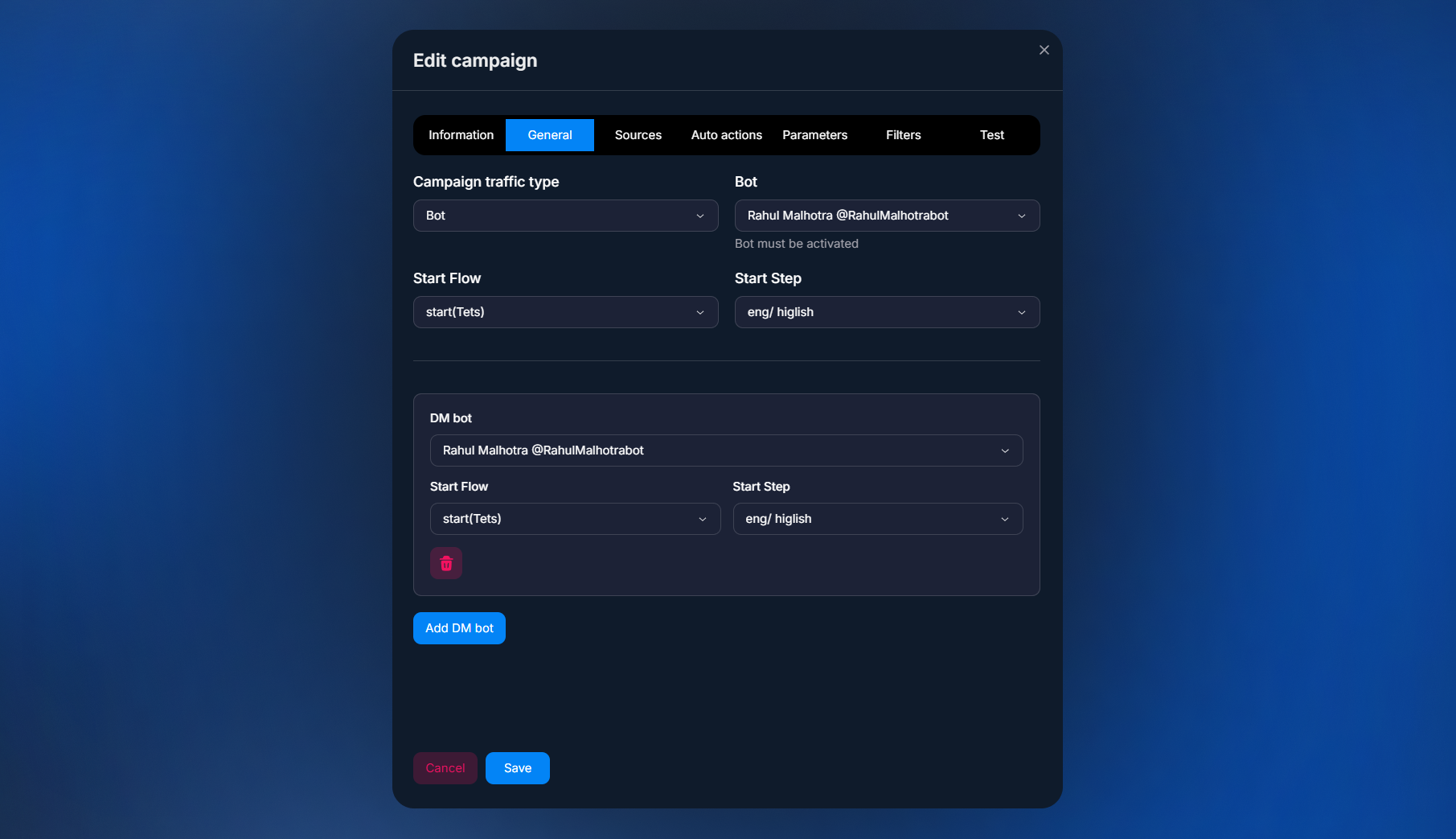
Why the DM bot is critical
When a lead follows the campaign link, Tracker creates a click record and saves the clickid. Then there are two possible touchpoints:
The lead requests to join the channel — the Invite bot captures the
Subscribe event and links it to the clickid through the link. This works without a DM bot.The lead sends the first message in a private chat — this is the
Contact event. To link it to the clickid, Tracker must know which bot to look for the conversation in. This bot is the DM bot — it is specified separately in the campaign.If no DM bot is selected, Contact and all subsequent events (Registration / FD / RD from the postback) will not be linked to the lead. Tracker “knows” that there was a click, but does not understand which chat the lead communicated in afterward. Postbacks from the affiliate network arrive, but there is nowhere to attach them — they go into “organic”.
How to fix it
Open the campaign
In Campaigns — advertising campaigns select the problematic campaign, go to the General tab (see General — user journey).Specify the DM bot
Find theDM Botfield and select the bot where communication with the lead takes place. This may be the same Standard bot as in Source, or a separate one, depending on the setup. If you have an Invite + DM setup (Invite + DM — Hybrid Scenario), these are two different bots.Wait for new events
Changes apply to new leads, not retroactively. Old leads without a link will remain “without Contact”. 5–10 minutes after a new real conversation, check Logs — event logs:Contactshould appear, then Registration / FD as postbacks arrive.
What is a “DM bot”
DM (Direct Message) Bot is an account inside Chatterfy through which the lead communicates in private messages. It can be a Standard bot by token or a Personal account. The key point is that it receives the lead’s first message and tells Tracker, “this lead wrote for the first time.”
To prevent this from happening again
When you create a new campaign, make sure to specify the DM bot during the wizard step How to create a campaign. If the campaign is “admission to a channel,” a DM bot is still required: communication after joining goes through it. Without a DM bot, channel traffic cannot be linked to FD.
Frequently asked questions
Related

недоступна

Invite + DM — Hybrid Scenario
The hybrid “Invite + DM” scenario is a classic traffic arbitrage setup. The user clicks an ad, lands on a landing page, goes to a bait Telegram channel, submits a join request, Invite Bot approves it,


Was this article helpful?