

Integrations — Partner Programs
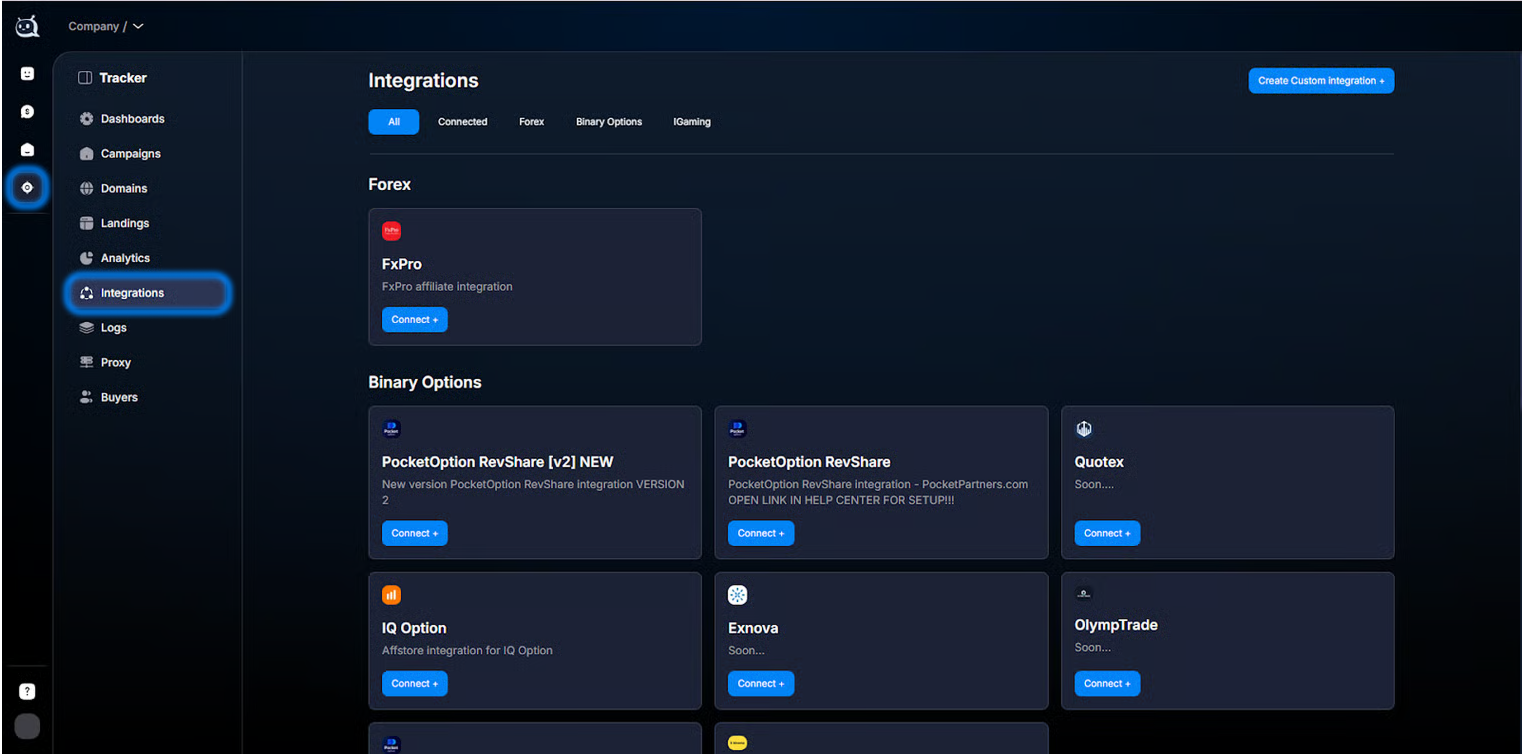
The Tracker → Integrations section is for connecting affiliate programs to Tracker . When a lead registers or makes a deposit with the affiliate program, it sends a postback (HTTP request) with an eve
The Tracker → Integrations section is for connecting affiliate programs to
Tracker. When a lead registers or makes a deposit with the affiliate program, it sends a postback (HTTP request) with an event to Tracker. We find the lead by clickid and link the event to them — it appears in Analytics, Dashboards, and the customer card in CRM.Without integration with the affiliate program,
Tracker does not know that the lead has registered — the Registration, FD, and RD events simply do not appear. This is a key step for any traffic where there is a “target action on the partner side” — casino arbitrage, forex, dating, e-commerce affiliate, any CPA offer. Integrations also power the Conversions API flow: Tracker receives the FD event from the affiliate program → automatically sends it back to Facebook Pixel / Google Ads, so the ad platform algorithms optimize for the real conversion, not for clicks.What this section helps you do
Connect an affiliate program from the ready-made list in one click (PocketOption, IQOption, and others). Create a custom integration for a rare affiliate program. Pass additional parameters (trader_id, promo, sumdep) and automatically create
Custom Fields in CRM. Debug missing events through Logs — event logs. See conversions “based on real money” — registration / sale / resale / withdraw in Analytics. Create Auto Actions based on affiliate-program events — automatically switch the Flow for leads with FD, update Sale Status, tag VIP.What’s inside


— Connecting Affiliate Programs— where the section is in
Chatterfy and what goes into it. Basic introduction.— How event forwarding works— a critical narrative article: how the clickid + postback flow works from the click to recording the event in the system. Read it before setup. Without understanding this mechanism, any troubleshooting turns into guesswork.
— Integration Types— two types: ready-made integrations (fast, template-based) or custom integrations (universal, any affiliate program). Which one to choose.
— Setting Up a Ready-Made Integration— how to set up a ready-made integration (using PocketOption as an example). 5-15 minutes for the full cycle.
— Custom Postback — custom integration— how to create a custom integration for any affiliate program. URL builder + macros. 15-30 minutes.
Use cases by niche
Affiliate integrations apply anywhere there is an external partner and a payment/action on their side. The most common scenarios:
- — Forex / crypto / casino arbitrage: ready-made integration (if the affiliate program is on the list) or custom. Standard events Registration → FD → RD → Withdraw come from the affiliate account. They are passed on to Facebook CAPI and Google Enhanced Conversions so ad platforms optimize for FD, not Subscribe.
- — E-commerce affiliate: a partner (CJ, Awin, Refersion) sends a Purchase event with amount. Used to calculate ROAS and optimize ads.
CustomField for the order number + amount.
- — Infobusiness with third-party acquiring: the payment system (GetCourse, Cloudpayments, Stripe) sends Purchase when the payment succeeds. Usually, this is a custom integration via .
- — Dating: the dating-site affiliate program sends Subscribe + Premium on upgrade.
CustomField — subscription type.
Where to start
- Don’t understand how the clickid → postback connection works — (required reading, 5 minutes).
- Affiliate network is in the list of ready-made integrations — (5–15 minutes to set up).
- Affiliate network is not on the list — (15–30 minutes).
- Not sure whether it is ready-made or custom — .
- Postback is not coming through — will show you.
- Want to automatically respond to a postback (tag, switch the flow) — .
Frequently asked questions
Section articles
Related


недоступна
Was this article helpful?