

Integration Types
In Tracker → Integrations, there are two types of integrations. The difference is in how much manual setup is required and in flexibility. When to use each type Ready-made — if your affiliate program
In Tracker → Integrations, there are two types of integrations. The difference is in how much manual setup is required and in flexibility.
When to use each type
Ready-made — if your affiliate program is on the list of supported ones. Most popular CPA affiliate programs (PocketOption, IQOption, Quotex, and other forex/crypto affiliate programs) are available as ready-made integrations. Setup takes 5–15 minutes. Custom — for rare affiliate programs, specific scenarios, or when you want full control over the set of events and parameters. Setup takes 15–30 minutes, but it is universal for any affiliate program.
Comparison
Parameter | Ready-made | Custom |
|---|---|---|
Setup time | 5–15 minutes | 15–30 minutes |
Supported affiliate programs | Only from the list of ready-made integrations (~30–50 popular ones) | Any affiliate program |
Postback URLs | Already prepared by the system | Must be created manually for each event |
Events | Standard set plus affiliate-program-specific events | Only the ones you specify |
Click ID Parameter | Default value hint; can be changed | Specify it yourself according to the affiliate program’s format |
Custom Fields | Often preconfigured (trader_id, and similar) | Any, via fields.<key> |
When to choose | Affiliate program is in the list | Affiliate program is not listed / you need flexibility |
Prebuilt integrations
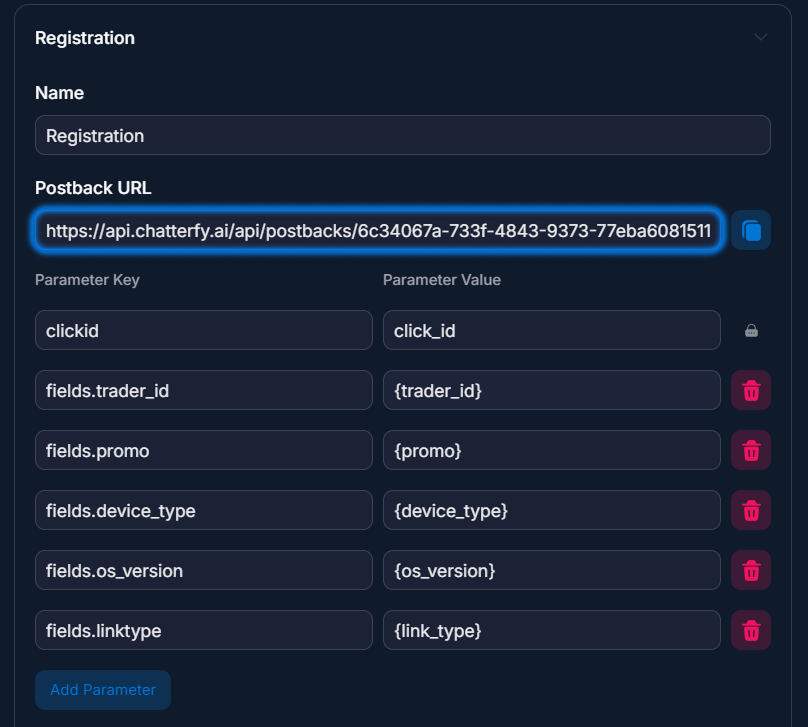
In a prebuilt integration, some of the settings have already been configured for you — Tracker knows this affiliate program and has prepared Postback URLs and parameters. What’s included:
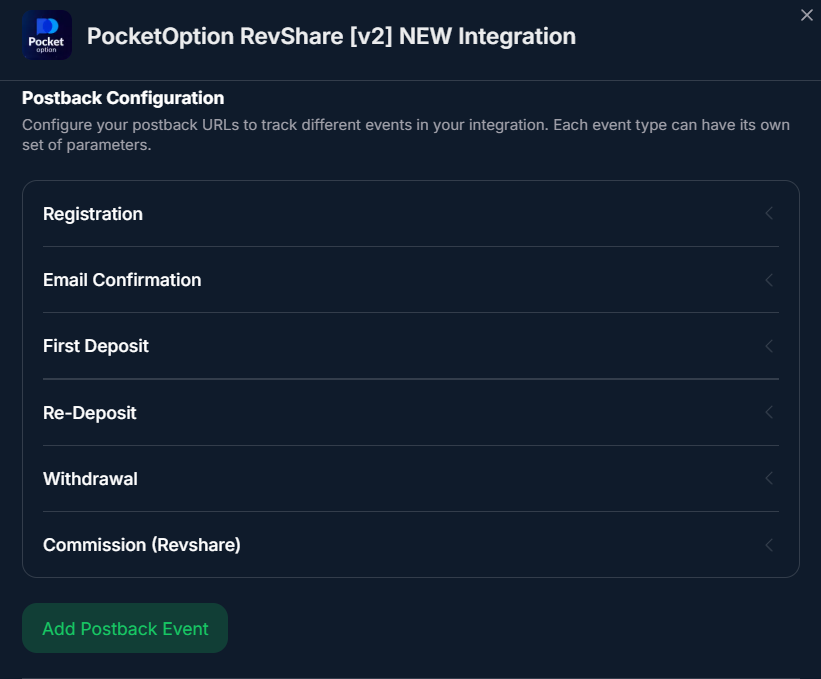
- — Postback URLs for each event (registration, sale, resale, withdraw, specific events).
- — Event names match how the affiliate program names them.
- — A hint for the default Click ID Parameter (often click_id for PocketOption, sub1 for others).
- — A list of Custom Fields (if the affiliate program usually passes trader_id, promo, and similar values).
What remains for you to do:
- — Copy the Postback URLs from Tracker.
- — Paste them into the affiliate program account.
- — Add a registration link with the {{tracker.clickid}} macro.
- — Make a test registration to verify it.
What you need for a prebuilt integration
- 1. The affiliate program is in the list of prebuilt integrations (open Integrations → check whether it’s there).
- 2. Activate the integration via Connect +.
- 3. Configure postbacks in the affiliate program account (paste our Postback URLs).
- 4. Add the registration link in Registration Links.
Custom integrations
A custom integration is for cases when:
- — The affiliate program is not in the list of ready-made integrations.
- — The affiliate program uses non-standard parameter names (for example, pbclick instead of sub1).
- — You want to pass custom parameters (promo code, player ID, transaction date) to Custom Fields in CRM.
- — The affiliate program has specific events (for example, KYC verification, deposit attempt, bonus conversion).
What you need to do manually:
- — Specify Click ID Parameter for the affiliate program’s format (clickid / sub1 / sub4 / pbclick / any other).
- — Create postback events through Add Postback Event — specify a name (registration, sale, resale, and any custom ones).
- — Copy the Postback URLs (Tracker generates them automatically for each event).
- — Paste the URLs into the affiliate program’s account.
- — Add a registration link.
You can pass any parameters through
fields.<key> in the postback — they will automatically create Custom Fields in CRM. For example:Постбек партнёркиplaintext
https://api.chatterfy.ai/api/postbacks/.../tracker-postback?clickid=abc123&tracker.event=sale&tracker.cost=200&tracker.currency=usd&fields.trader_id=99887&fields.promo=DEC2026After that, the lead card in CRM will show the fields
trader_id = 99887 and promo = DEC2026. For details, see Custom Postback — custom integration.What is important in a custom integration
The
clickid parameter is required in the postback. Without it, Tracker will not be able to link the event to the lead. In Tracker, you specify the name under which the affiliate program sends clickid (Click ID Parameter), and in the registration link you use the corresponding macro:Регистрационная ссылкаplaintext
https://partner.com/signup?pbclick={{tracker.clickid}}And in Tracker, Click ID Parameter =
pbclick (the exact name the affiliate program uses in the postback).Usage examples
Connecting PocketOption — arbitrage
Buyer connects PocketOption RevShare. It is available in the list of ready-made integrations. They click Connect + and follow the instructions Setting Up a Ready-Made Integration. Everything is ready in 10 minutes, the test registration went through, and postbacks are coming in.
Connecting a rare forex affiliate program — arbitrage
Buyer works with a little-known affiliate program, TradingHub Pro. It is not available in the ready-made integrations. They create a Custom integration through Custom Postback — custom integration. They specify Click ID Parameter =
clickid (as in the program’s documentation). They create three events: registration, sale, resale. They copy the Postback URLs and send them to the affiliate program. An hour later, the first postback arrives.Custom for non-standard events — performance marketing
A sales agency manages an e-commerce client whose affiliate program has unique events:
cart_abandoned, order_paid, refund. It creates a Custom integration, with a separate Postback Event for each event. It adds fields.product_category, fields.order_value — these parameters automatically go into Custom Fields in the CRM. The marketer now sees “the lead bought a Shoes category product for $89”.What to keep in mind
If the affiliate program is available as a ready-made integration — always choose the ready-made one — it saves time and reduces the chance of mistakes. Event names in a custom integration must match those used by the affiliate program — otherwise the postback will come in “misaligned” by event. Check against the affiliate program’s documentation. You can pass any parameters through
fields.<key> — this is a powerful mechanism, do not ignore it. If you can choose how the affiliate program sends data, via standard parameters or fields — choose fields. This lets the operator in the CRM see the lead context as fully as possible.Frequently asked questions
Related


Was this article helpful?