

Connecting Affiliate Programs
The Tracker → Integrations section is a list of your active integrations with affiliate programs. Each integration defines how Tracker receives postbacks from a specific partner. This article is a sho
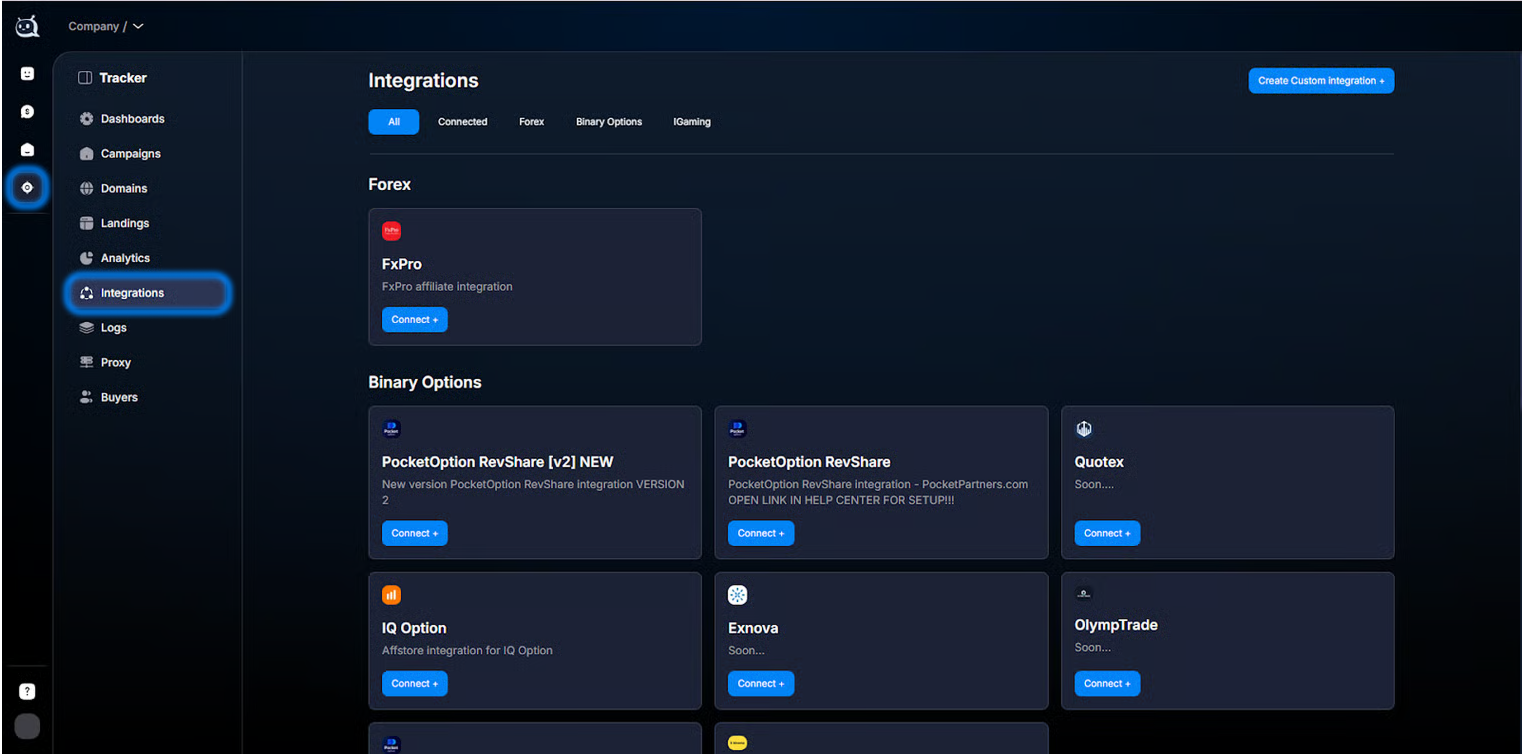
The Tracker → Integrations section is a list of your active integrations with affiliate programs. Each integration defines how Tracker receives postbacks from a specific partner.
This article is a short introduction: where the section is and what it contains. If you want to understand how event transfer works — How event forwarding works. If you want to connect a new affiliate program — Integration Types to choose a type.
When to use this section
You are connecting a new affiliate program. You are checking the list of existing integrations. You want to edit the settings of an already connected affiliate program (change the Click ID Parameter, add an event). You received a notification from the affiliate program about an API change — you need to update the integration.
How it works
For Tracker to know that a lead has performed an action on the partner’s side, the affiliate program sends a postback (an HTTP request to your URL inside Tracker) with event parameters. Tracker:
- — Receives the request at its endpoint https://api.chatterfy.ai/api/postbacks/.
- — Extracts the clickid from the request parameters.
- — Finds the lead with this clickid in its database.
- — Records the event in the lead card and in the overall analytics.
Typical affiliate program events
Event | What it means | When it arrives |
|---|---|---|
registration | Registration in the affiliate program. | The lead registered through your link. |
sale | First deposit (FD). The main target event in media buying. | The lead deposited money for the first time (FTD). |
resale | Repeat deposit (RD). | The lead deposits money again (one lead can do this many times). |
withdraw | Withdrawal of funds from the affiliate program. | The lead took the money back. |
Custom события | Email confirmation, KYC verification, any specific event. Depends on the affiliate program. | According to the affiliate program’s rules. |
Tracker displays all events in Analytics — detailed table and Dashboards — Summary Analytics (standard ones — Registration, FD, RD; custom ones — as separate metrics or via the
event filter). Events also appear in the lead card in CRM under Events.Steps to open the section
Open Tracker
From the main Chatterfy menu — Tracker.Go to Integrations
In the left Tracker menu — the Integrations section.Review the list
All your active integrations are shown. Each one is a card with a name, status, and short description.Act according to the situation
To open an existing one, click the card. To connect a new one, click Connect next to a ready-made affiliate program or Create Custom integration. For details, see Integration Types.
Usage examples
Connecting PocketOption — arbitrage
A Buyer wants to send traffic to PocketOption RevShare. They open Integrations and see the ready-made
PocketOption RevShare [v2] integration in the list. They click Connect and go through Setting Up a Ready-Made Integration. The integration is set up in 10 minutes.Connecting a niche affiliate network — arbitrage
Buyer works with a little-known affiliate network CryptoOffer.ai. It is not on the ready-made list. They create a Custom integration via Custom Postback — custom integration. Specify the affiliate network name, Click ID Parameter, and events (registration, sale, resale). They receive Postback URLs and give them to the affiliate network. After a few hours, the first postbacks start coming in.
Integration audit — quarterly
Once a quarter, the Buyer Team Lead performs a review: opens Integrations, goes through each one, and checks when the last postback came in (visible via Logs — event logs). If an integration is silent, they fix it or delete it.
What is important to consider
An integration is not an “agreement with the affiliate network”; it is only a technical setup for receiving postbacks from its side. The agreement / affiliate account is arranged with the affiliate network itself. The Postback URL is unique to your company in Tracker — do not share it publicly; otherwise, outsiders can send “fake” postbacks to your analytics. Each affiliate network should be connected once — after that, all your campaigns that use it share one integration.
Frequently asked questions
Related


Was this article helpful?