Skip to content
ChatterfyHelp Center
HomeGeneralCRMAI ManagerTrackerPlatformsFAQUpdate log
FAQ
Tracker Errors
Telegram Errors
FAQs
Frequently Asked Questions
The bot stopped accepting channel join requests — why?
Do I have to keep my balance above $100?
AI takes a long time to respond / works slowly
Channel not visible when creating a channel campaign — how to fix it?
I imported a flow, but the bot is still following the old funnel
Why the AI Doesn't Skip a Step If the Lead Has Already Answered Appropriately
How to make the bot wait for a lead's reply
How to remove the keyboard (reply keyboard) for a lead
How do I restart a funnel for a lead?
Requirements for Uploading a Custom Landing Page
Uneven A/B testing — 90% to one branch, 10% to the other
Voice message without visualization (waveform)
Why conversations and events are not tracked — only Subscribe
How to Send a Round Video Message (Video Note) Correctly
How to avoid video compression when sending videos
How to hide chats between agents
  1. FAQ
  2. FAQs
  3. How to make the bot wait for a lead's reply

How to make the bot wait for a lead's reply

By default, the bot goes through the flow without stopping — it executes the steps sequentially from start to finish. To make it pause and wait for a message from the lead , you need two settings on a

Updated August 30, 20262 min
By default, the bot goes through the flow without stopping — it executes the steps sequentially from start to finish. To make it pause and wait for a message from the lead, you need two settings on a specific step: Finish Status = Waiting and Skip the transition to next step.
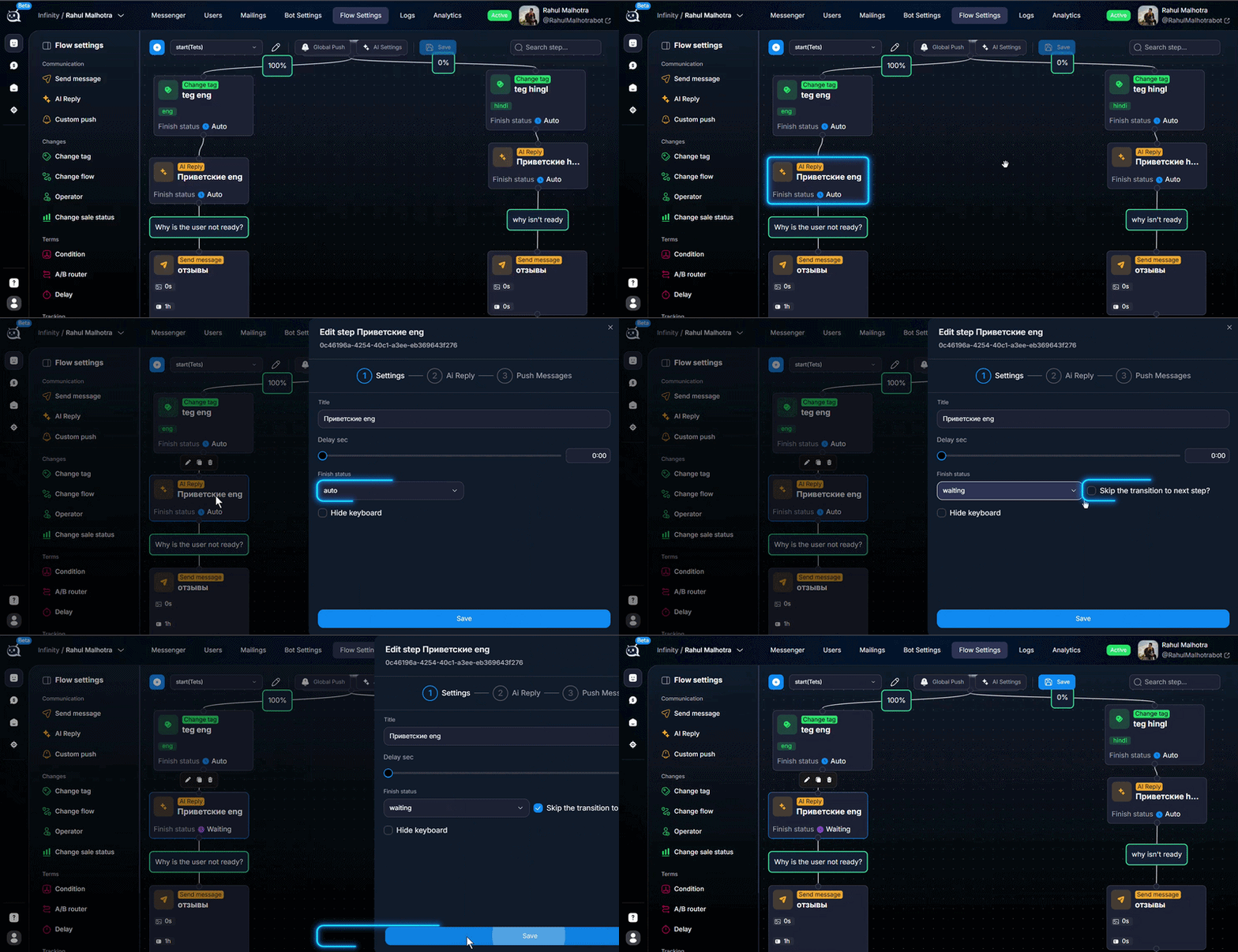
Setting up waiting for a response at a flow step
Finish Status = Waiting + Skip transition to next step


Why you need this

Scenarios where the bot should wait:
A lead has just registered — you need to give them time to take the first step (open the app, view the landing page), and only then continue nurturing them.
After the greeting — the bot waits for an answer to a specific question; otherwise, the lead will not have time to read it.
Before handing off to AI Reply — you need to wait for a message from the lead so there is something to process.
After switching the dialog status to an operator — the flow is paused until the operator hands it back.


How to configure it

  1. 1

    Open the required step

    In Flow Settings select the step where the bot should pause. Usually, this is the last Send Message before waiting — for example, after the phrase “send me your email.”
  2. 2

    Set Finish Status = Waiting

    This sets the chat status to Waiting after the step is completed — the dialog will be marked as “waiting for a lead response” in Messenger. See Chat Status — conversation statuses about statuses.
  3. 3

    Enable Skip the transition to next step

    This checkbox stops the automatic transition to the next step. The bot will execute this step and stop there — nothing will happen until the lead sends a message. As soon as the lead replies, the flow continues.
Skip without Waiting and vice versa
Skip the transition without Finish Status = Waiting — the bot will also pause, but in Messenger the status will remain as it was. Finish Status = Waiting without Skip — the status will change, but the bot will still move on after a short delay. For the classic “wait for a lead response” behavior, you need both settings at the same time.
To prevent this from happening again
When building a funnel, plan pauses in advance. Any step where “the bot asks something and then does something” almost always needs the Finish Status = Waiting + Skip pair. Otherwise, the bot simply sends the lead a series of messages without giving them a chance to reply.


Frequently asked questions

By default, it waits indefinitely. If you want to move a “stuck” lead on after N hours, add Push Messages — Re-engaging Silent Users after the waiting step. Push Messages are triggered by a timing condition (after X minutes / hours / days of silence).

Yes. Any incoming message from the lead (text, photo, voice message, sticker, document) starts the flow further. If you want to accept only text replies, add a Condition — conditional branching step after Waiting with a check for the message type.

Via AI Routings — semantic routing or Condition — conditional branching — yes. The lead sends any message, then routings/condition checks the content and sends them to the appropriate branch. If the reply does not match, an operator intervenes or AI Reply asks for clarification.

The most common reason is forgetting to enable Skip the transition to next step. Finish Status = Waiting alone does not stop the step. Check both boxes.


Related

Chat Status — conversation statuses
Status is the main technical parameter of a conversation. It shows the current state of the chat and determines: who responds to the user — AI or an operator whether Push Messages (Global/Step push) a
Push Messages — Re-engaging Silent Users
Push messages are delayed messages that are sent if a lead does not respond at the current step. This is a nurturing tool: the first reminder after 10 minutes, the second after an hour, the third the
AI Reply — smart replies via AI
The AI Reply step is the main step for communicating via AI. In this step, the bot generates a response using a neural network, taking into account the lead’s message, the conversation context, flow-l
Condition — conditional branching
The Condition step branches the flow based on exact values in the lead’s data. Tag exists — left. deposit greater than $100 — right. time from 12 to 18 — third branch. This is the opposite of “AI Rout

Was this article helpful?

BackWhy the AI Doesn't Skip a Step If the Lead Has Already Answered AppropriatelyNextHow to remove the keyboard (reply keyboard) for a lead

On this page

  • Why you need this
  • How to configure it
  • Frequently asked questions
  • Related