Skip to content
ChatterfyHelp Center
HomeGeneralCRMAI ManagerTrackerPlatformsFAQUpdate log
FAQ
Tracker Errors
Telegram Errors
FAQs
Frequently Asked Questions
The bot stopped accepting channel join requests — why?
Do I have to keep my balance above $100?
AI takes a long time to respond / works slowly
Channel not visible when creating a channel campaign — how to fix it?
I imported a flow, but the bot is still following the old funnel
Why the AI Doesn't Skip a Step If the Lead Has Already Answered Appropriately
How to make the bot wait for a lead's reply
How to remove the keyboard (reply keyboard) for a lead
How do I restart a funnel for a lead?
Requirements for Uploading a Custom Landing Page
Uneven A/B testing — 90% to one branch, 10% to the other
Voice message without visualization (waveform)
Why conversations and events are not tracked — only Subscribe
How to Send a Round Video Message (Video Note) Correctly
How to avoid video compression when sending videos
How to hide chats between agents
  1. FAQ
  2. FAQs
  3. Why the AI Doesn't Skip a Step If the Lead Has Already Answered Appropriately

Why the AI Doesn't Skip a Step If the Lead Has Already Answered Appropriately

Standard behavior of the AI Reply step: it first generates its response , then checks AI Routings and moves to the required branch. If you want AI to skip its own response when the lead’s message alre

Updated June 21, 20262 min
Standard behavior of the AI Reply step: it first generates its response, then checks AI Routings and moves to the required branch. If you want AI to skip its own response when the lead’s message already clearly matches one of the routings, enable the Skip transition blocking on first run option.
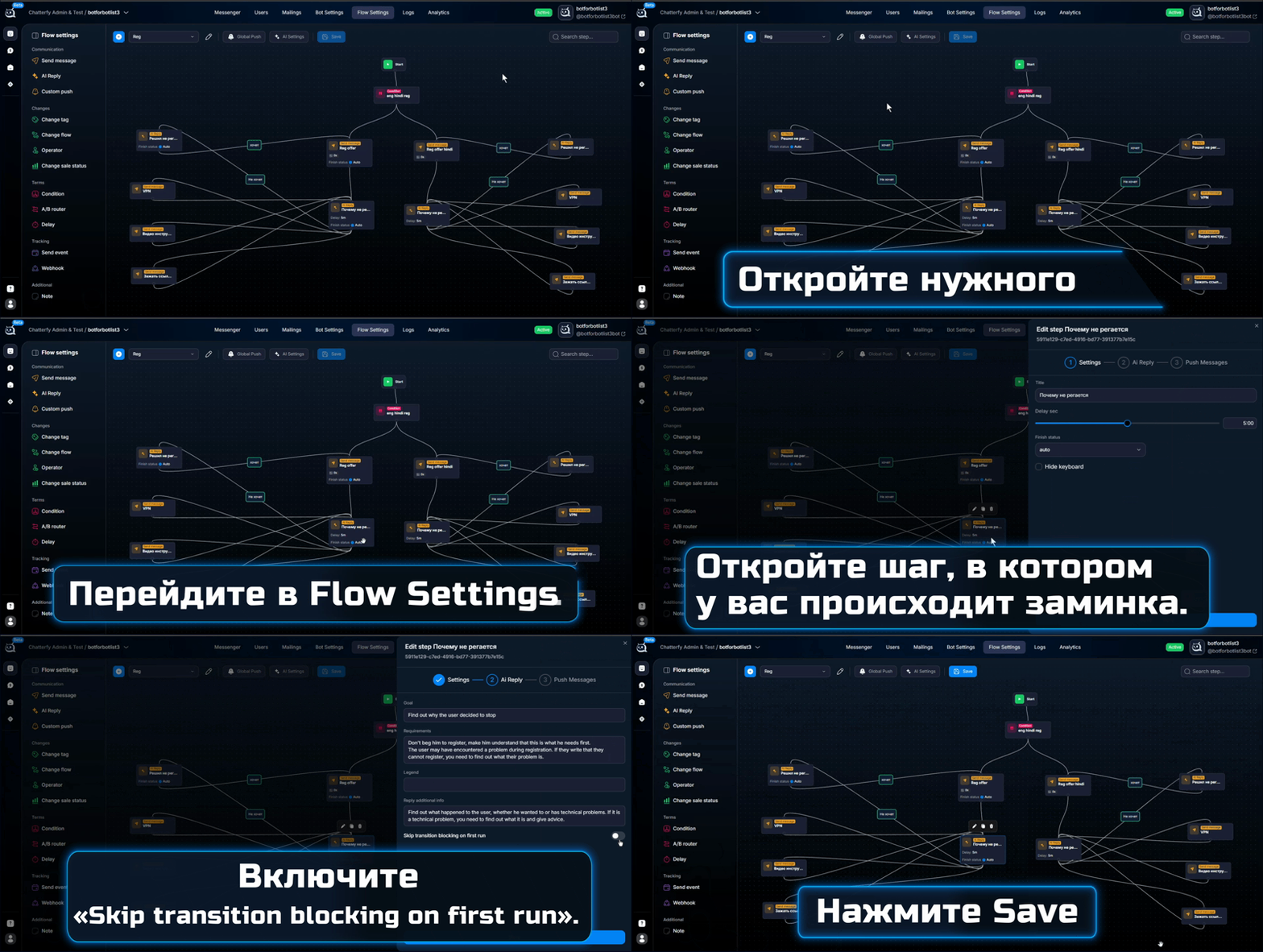
Enabling Skip transition blocking on first run in the AI Reply step
The “Skip transition blocking on first run” checkbox in the AI Reply settings


Why this is needed

Skip on the first interaction is useful in scenarios where AI acts as a router, not as a conversational agent. Example: the lead has already said “I want to sign up” — there is no point generating the response “great, let me tell you more”; it’s better to move them directly to the step with instructions. Without Skip, AI will always insert its own message, and the transition will happen only after it.
This is done deliberately so AI does not “miss” the moment in an active conversation. On most steps, the option remains disabled — AI carries on the conversation and manages transitions itself through AI Routings — semantic routing.


How to configure it

  1. 1

    Open the AI Reply step

    In Flow Settings find the required AI Reply step.
  2. 2

    Enable Skip transition blocking on first run

    The checkbox is located at the bottom of the step settings. Enable it and save.
  3. 3

    Check the routings behavior

    Start a test run. If the lead’s first message clearly falls under one of the branches, AI will skip its response and perform the transition immediately. If the response is ambiguous, AI will still generate a reply to clarify.
When not to enable Skip
If the step is the “heart” of the conversation, where AI should conduct the dialogue for several messages in a row (qualification, warm-up, long client replies), leave Skip disabled. Otherwise, AI will skip its first response and move somewhere too early, before it has collected the data.
When it makes sense to enable it
Skip makes sense on “decision” steps: confirming a choice, transitions between funnel stages, responding to a menu (when the lead clicked a button). Anywhere the lead’s first response already provides all the information needed for the transition.


FAQ

Skip triggers only if the lead’s response confidently matches one of the routings. If AI is not sure (the wording is vague, several branches match), it generates its own reply to clarify. This is the correct behavior. To increase confidence, specify more concrete conditions in AI Routings — semantic routing and use clear branch names.

No, it disables it only on the first run of the step. If the lead returns to this step again through a branch, AI Reply will work in the normal mode and generate a response.

Without routings, the option has no meaning — there is nowhere to skip to. If you use AI Reply as a “conversational agent” without transitions, leave Skip disabled.

Deep dive — in AI Routings — Deep Dive and AI Routings — semantic routing (reference). Add anti-patterns there as well.


Related

AI Reply — smart replies via AI
The AI Reply step is the main step for communicating via AI. In this step, the bot generates a response using a neural network, taking into account the lead’s message, the conversation context, flow-l
AI Routings — semantic routing
The AI Routings step is fuzzy routing. It is connected after AI Reply and routes the lead to different next steps depending on the meaning of their reply. Conditions are described in natural language;
AI Reply — detailed breakdown of the step
Unlike a regular Send Message, AI Reply does not send prewritten text. AI generates a reply when a message is received from the user. AI Reply is used for: communicating with the user handling objecti
AI Routings — Deep Dive
• AI Routings is the most misunderstood layer of AI in Chatterfy. It seems similar to a regular , но устроен иначе и решает другую задачу. Reference на сами Routings — , but it is built differently an

Was this article helpful?

BackI imported a flow, but the bot is still following the old funnelNextHow to make the bot wait for a lead's reply

On this page

  • Why this is needed
  • How to configure it
  • FAQ
  • Related