

AI Models — Complete Guide to AI Models in Chatterfy
Here you select the models for generating replies and routing, as well as an approximate estimate of the conversation cost. The quality of your bot’s overall performance depends on the model you choos
Here you select the models for generating replies and routing, as well as an approximate estimate of the conversation cost.
The quality of your bot’s overall performance depends on the model you choose — even a perfectly configured flow will perform poorly on an unsuitable model.
The model affects reply quality, routing, compliance with restrictions, speed, and conversation cost. Therefore, choosing the tier and specific model is part of funnel setup, not a cosmetic detail.
Why choosing an AI model matters
The AI model is the foundation: it determines how the model follows the commands described in the settings and how it behaves when interacting with leads.
What depends on the model
Parameter | What it affects |
Reply quality — AI Reply | How logically and naturally the AI responds |
Context — AI Summary | Whether the AI retains previous messages and uses them later to route the conversation to the right branch of the funnel |
Restrictions | Whether the AI follows the restrictions |
Sales | How effectively the AI handles objections |
Speed | How quickly the reply arrives |
Stability | How predictably the AI behaves |
Cost | The price of one conversation |
Why the same setup works differently
AI Settings is a set of instructions for the model. The AI’s behavior is influenced most by:


Example: three models from different segments receive the same
Goal / Restrictions / Global Legend / Reply Style. But one maintains the role perfectly, another starts improvising, and the third ignores some of the restrictions.The model is not “styling,” but the foundation of AI behavior. Before configuring prompts and instructions, study the specifics of writing prompts for your model — this will help you achieve stable, high-quality execution of the tasks you set.
How the model affects AI Reply
Weak models:
- Lose context
- Give template-based answers and get confused easily
- Follow conditions and instructions less reliably
- Break down in long conversations
- Handle objections less effectively
Strong models:
- Take the lead’s message into account better
- Communicate more naturally and use available information about the lead
- Maintain long context
- Handle objections more effectively
- Maintain the conversation logic more consistently
How the model affects AI Summary
AI Summary creates a brief description with the key points of the conversation.
It is also responsible for the logic of moving the lead through the steps of your funnel.
Workflow:
- AI Summary analyzes the lead’s latest messages and creates or supplements the existing context, then compares the received data with your routing conditions
- It then decides whether to keep the lead at the current step or move them further through the funnel
Example: the lead writes, “It’s too expensive for me right now.” A weak model may mistakenly count this as interest and keep the lead at the current step for further discussion, or create an incorrect conversation context. A strong model recognizes the price objection and moves the lead to the objection-handling branch, if one has been built.
Дополнительно: Summary помогает AI модели, помнить историю ответы и ключевые моменты с лидом и использовать эту информацию для построения качественного и персонализированного диалога.
Types of AI tasks on the platform
In Chatterfy, AI is used for three main tasks:
AI task type | What it is used for |
AI Reply | Generating replies to the lead |
AI Summary | A brief summary of the key points of the conversation, preserving context and routing the lead through funnel blocks |
AI Reply — generating replies to the lead
- Generating messages
- Managing the conversation
- Handling objections
- Communication style and format
This is the main AI mechanism for communicating with the lead.
AI Summary — creates a brief summary with the key points of the conversation and manages the logic of transitions through the funnel
is responsible for:
- Creating a conversation summary
- Capturing key information
- Logic and reasoning
- Routing depending on transition conditions
Which AI models are available in Chatterfy
Currently, 25 modern models are available on the platform, each segmented by price range
All models are divided into tiers:
Tier | Price per conversation | What it is suitable for |
Nano | $0.01–0.05 | The simplest and most budget-friendly solutions. Ideal for linear scripts, short notifications, or initial filtering of the incoming flow |
Lite | $0.05–0.1 | Optimal balance between cost savings and quality. Handles typical questions and standard funnel stages well |
Standard | $0.11–0.2 | A versatile choice for most teams. Models at this level confidently maintain context, handle objections, and follow complex instructions |
Premium | $0.21–0.75 | Complex AI logic. Designed for deep expert sales, where high variability in argumentation, handling non-standard requests, and “smart” client closing are important |
Ultra | $0.76–2 | Heavyweight models for the most ambitious tasks. The highest level of intelligence, deep data analytics, and multi-level negotiations at the level of a top sales manager |
How to get to the AI Models section
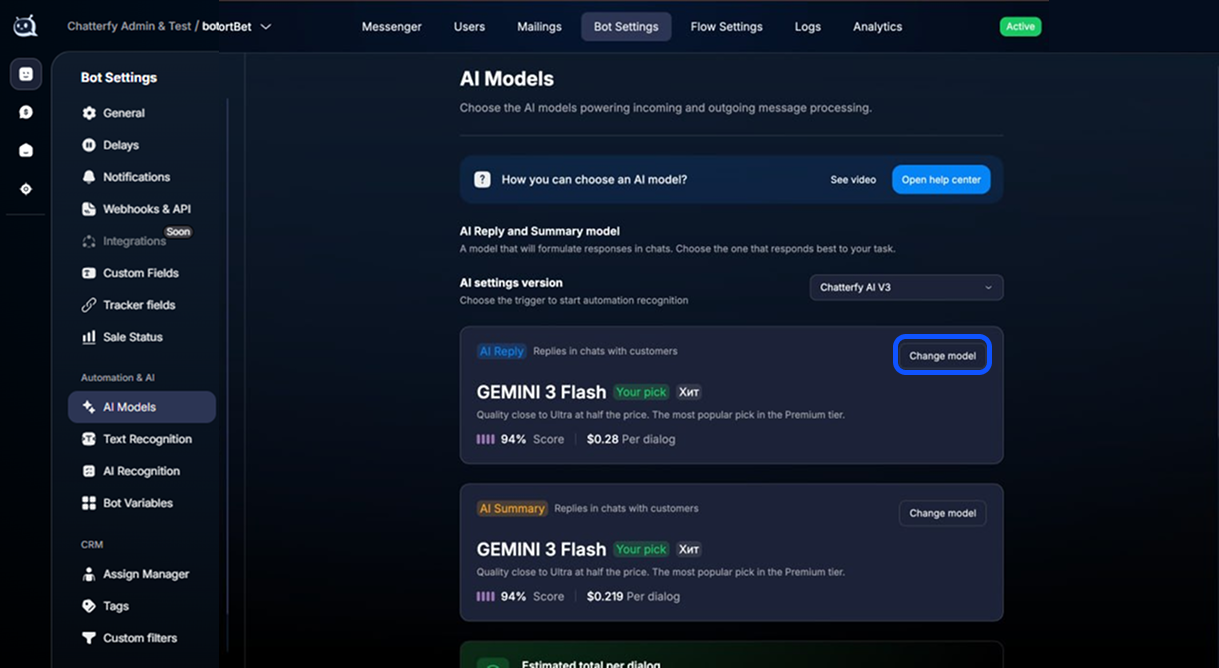
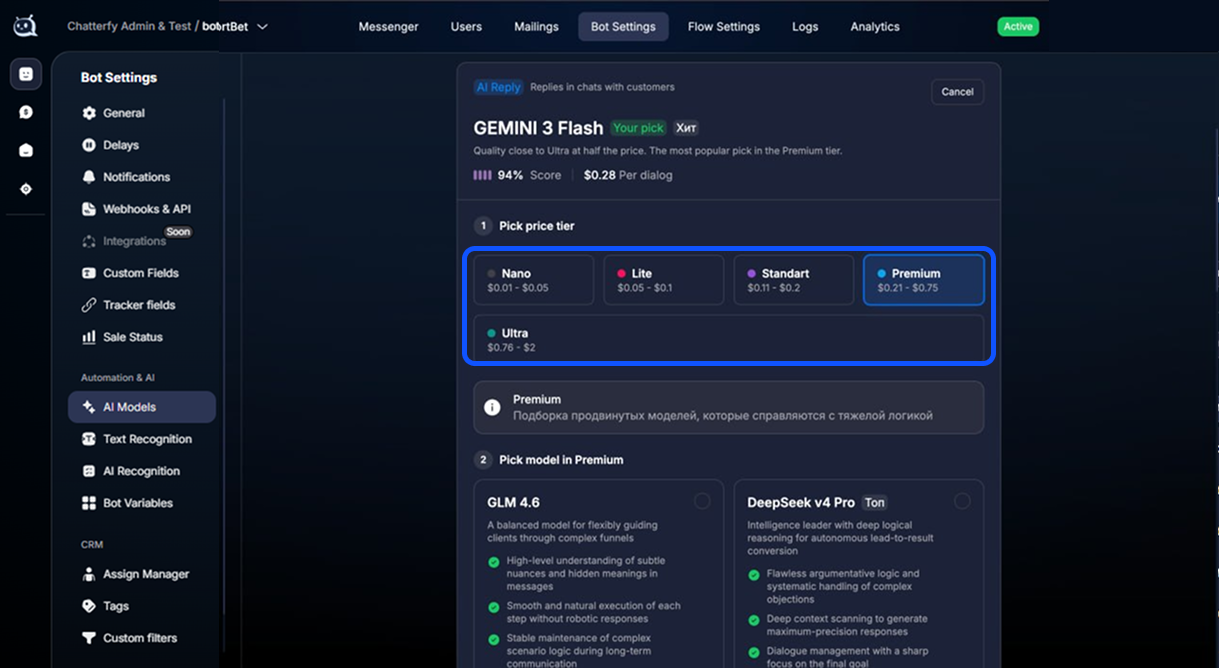
Nano segment — minimum price
Price range: $0.01 — $0.05 per conversation.
This level is ideal for initial lead qualification and simple linear scenarios where speed and the minimum cost of each touchpoint are important.
Z-AI GLM 4.7 Flash
Style: Natural communication and “human-like” language. Best in the segment at maintaining the thread of a long conversation.
Plus: High engagement and coherent responses.
Nuance: Tendency toward excessive detail (sometimes answers too thoroughly).
Chatterfy Stark
Style: Extremely simple and effective communication.
Plus: Extremely low price. An ideal solution for simple high-volume tasks without complex logic.
Nuance: Not suitable for deep expert consultations.
Xiaomi MiMo v2 Flash Lite
Style: Fast, technical answers within a step-by-step algorithm.
Plus: Flawless performance under a huge flow of incoming requests.
Nuance: Works best in simple, strictly defined scenarios.
Xiaomi MiMo v2 Flash Turbo
Style: Brevity and high speed.
Plus: Maximum response speed and strict adherence to the dialogue structure.
Nuance: Responses may seem dry because of their brevity.
Lite Segment
Price range: $0.05 — $0.10 per conversation.
One of the most in-demand segments. This is the “golden mean” suitable for 80% of tasks: from active sales and support to complex logic in an AI flow.
Step 3.5 Flash
Plus: Guides the lead through the scenario stages with precision. Very fast response.
Ideal for: Step-by-step algorithms where it is important not to let the customer “go off track.”
Tencent Hy3
Plus: One of the leaders in price-to-intelligence ratio. Demonstrates “ironclad” discipline in following instructions.
Ideal for: Tasks where predictability and strict adherence to rules are important.
Google Gemini 2.5 Flash Lite
Plus: Easily handles huge amounts of information (long context) without losing focus.
Ideal for: Tasks where you need to maintain lively communication and follow the funnel logic.
Chatterfy Atom
Plus: Stands out for high-quality, well-calibrated wording and strong stability.
Ideal for: Professional customer support.
Qwen 3 Next
Plus: Powerful mathematical logic and impeccable response structure.
Ideal for: Projects in different languages and complex structured dialogues.
Chatterfy Optimus 2.0
“Condition Architect”
Plus: Does not get lost in contexts with hundreds of transitions. Easily handles non-standard questions.
Ideal for: Projects with branching logic and a large number of conditions.
Minimax m2.5
Plus: Stands out for emotional intelligence. Adapts to the lead’s mood, creating the effect of communicating with a real person.
Ideal for: Sales where empathy and establishing personal contact are important.
Standard Segment
Price range: $0.11 — $0.20 per conversation.
Standard models have enough “intellectual weight” to handle full-fledged sales, work through deep objections, and operate in long scenarios where it is critical not to lose the thread of the conversation.DeepSeek v4 Flash
Plus: Remarkable speed for a model of this level. Demonstrates strict adherence to complex instructions.
Ideal for: High-load projects where complex objections need to be closed.
Google Gemini 3.1 Flash Light
Plus: Perfectly calibrated response quality. Works quickly, predictably, and without failures.
Ideal for: High-volume scenarios with increased requirements for text quality and logic.
Qwen 3.6 Plus
Plus: A perfectionist model. Maintains the dialogue structure flawlessly and follows the strictest regulations.
Ideal for: Scenarios and logic where deviation from the script is unacceptable.
Premium segment — complex AI scenarios
Price range: $0.21 — $0.75 per dialogue.
This tier is designed for “smart” sales and high-value products.
Premium-class models can handle complex negotiations, recognize manipulation, and guide customers through multi-level funnels where simply answering is not enough — they need to persuade.Google Gemini 3 Flash
Plus: One of the best indicators for response quality. Delivers consistently strong results even under heavy requirements.
Ideal for: Large-scale projects with increased communication requirements.
DeepSeek v4 Pro
Plus: Has “ironclad” logic. The best model for handling tough objections and deliberately pushing a lead toward the close.
Ideal for: Active aggressive sales and complex closings.
KIMI K2.5 Turbo / K2.6
Plus: Keeps every word from the customer in memory. Version 2.6 also reads the emotional background and subtle mood nuances.
Ideal for: Very long deal cycles and warm, relationship-driven sales where personal contact matters.
OpenAI GPT 5.1
Plus: Extremely deep conversation analysis and flawless logic. Not afraid of complex funnel specifications.
Ideal for: Managing complex dialogues and building personalized communication.
Z-AI GLM 4.6 / GLM 5
Plus: GLM 4.6 sees hidden meanings, while GLM 5 masterfully breaks down customer objections without making factual errors.
Ideal for: Consultative sales where details need to be explained clearly and at length.
Xiaomi MIMO v2 Pro
Plus: Perfect adherence to instructions. A straight-A model that does not deviate from the assigned scenario by a single step.
Ideal for: “ironclad” control over the dialogue. This model eliminates any improvisation, guaranteeing that the customer receives information exactly in the form in which it is written.
Ultra segment — maximum intelligence
Price per dialogue: $0.76 — $2.00
The peak of technological capabilities. These models are the “heavy artillery” for VIP sales and high-ticket deals. Where other models simply follow the script, the
Ultra segment conducts a subtle psychological game, reads the subtext, and manages the customer’s attention at the level of top negotiators.Google Gemini 3.1 Pro
Plus: Receives top scores in all tests. Fits into the role perfectly, masterfully recognizes hidden objections and manipulations that other models do not see.
Ideal for: The most critical funnels and
Premium scenarios where the cost of a mistake is losing a high-status customer.GROK 4.2
Plus: Incredibly powerful Reasoning. The model “thinks” before answering, deeply analyzes every word from the customer, and finds logical hooks even with the most closed-off and complex leads.
Ideal for: Critically complex negotiations and working with audiences prone to strong skepticism.
OpenAI GPT 5.2 Chat
Plus: Strikingly natural, “human” communication. Instantly reads the subtext, adapts its style to the lead’s psychotype, and builds the dialogue as if the best sales rep in the company were on the other end of the line.
Ideal for: Elegant sales of high-ticket products, where not only logic matters but also an impeccable communication style.
How to choose a model
The choice of model depends on the lead cost, product complexity, and expected depth of the dialogue. Use this table as a quick reference for configuring your funnel.
Selection recommendations:
Tier | Cost per conversation | Best suited for |
Nano | $0.01–0.05 | The simplest and most budget-friendly solutions. Ideal for linear scripts, short notifications, or initial filtering of the inbound flow |
Lite | $0.05–0.1 | The optimal balance between cost savings and quality. Handles typical questions and standard funnel stages well |
Standard | $0.11–0.2 | A versatile choice for most teams. Models at this level confidently maintain context, handle objections, and follow complex instructions |
Premium | $0.21–0.75 | Advanced AI logic. Designed for deep expert sales, where high variability in argumentation, handling non-standard requests, and intelligently nudging the customer toward a decision are important |
Ultra | $0.76–2 | Heavyweight models for the most ambitious tasks. The highest level of intelligence, deep data analytics, and multi-level negotiations at the level of a top sales manager |
What to consider
Дороже — не значит лучше.
Если ваш промпт составлен слабо или размыто, даже топовая модель Ultra будет выдавать посредственные ответы. Цена модели не компенсирует отсутствие логики в инструкциях.
Промпт — это фундамент. Качество и структура ваших промптов важнее, чем название модели. Хорошо прописанный скрипт на
Lite может работать лучше, чем плохой на Premium.Баланс — залог прибыли. 90% успешных клиентов отлично чувствуют себя на уровнях Lite или Standard. Тестируйте разные модели и находите наилучшее сочетание цена/ качество для выших задач.
How to configure the AI model
Open
Bot Settings → AI Models. Inside this section, you will find:
How to change the model
- Open AI Models.
- Select a block: AI Reply model or AI Summary.
- Select a tier (Nano / Lite / Standard / Premium / Ultra).
- Select a specific model.
- Click Save changes.
After saving, new AI requests will start using the selected model.
Reply Style — configuring the tone of responses

Reply Style is your tool for managing the “strictness” of AI. It determines how literally the model will follow the prompt text or how much it is allowed to improvise in the conversation.Three levels of model “freedom”
Style | Level | What it does | |
Focused | Low | Strict discipline. AI follows the script literally. Responses are dry, predictable, and always “to the point.” | |
Balanced | Medium | Flexible standard. A balance between the instructions and natural adaptation to the lead’s replies. The default mode. | |
Creative | High | Free style. AI easily changes its tone and wording to sound as human as possible | |
Estimated total per dialog
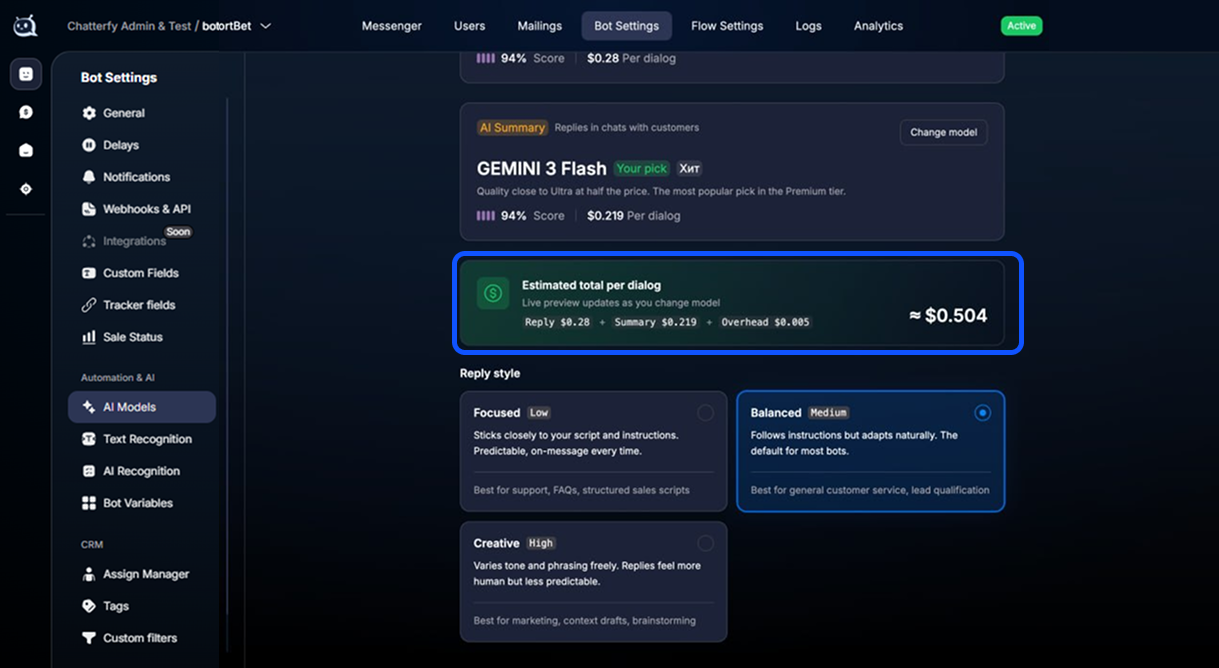
Estimated total per dialog — cost estimate
At the bottom of the
AI Models block, you will see the Estimated total per dialog metric. This is your financial benchmark, which summarizes the projected costs of running all AI models within a single conversation.The total cost consists of several processes:
AI Reply: Generating replies to the customer using the model you selected.AI Summary: Routing leads through the funnel and creating a condensed context. Служебные AI-операции: Технические запросы для корректной работы логики бота.This is an approximate estimate, not a fixed price. The actual cost of a single conversation depends on the length of the conversation, the number of AI calls, the size of the prompts, and other factors. You can see the exact usage in Billing — bot expenses.
Frequently Asked Questions
Related


Was this article helpful?