

AI Settings — Bot Personality
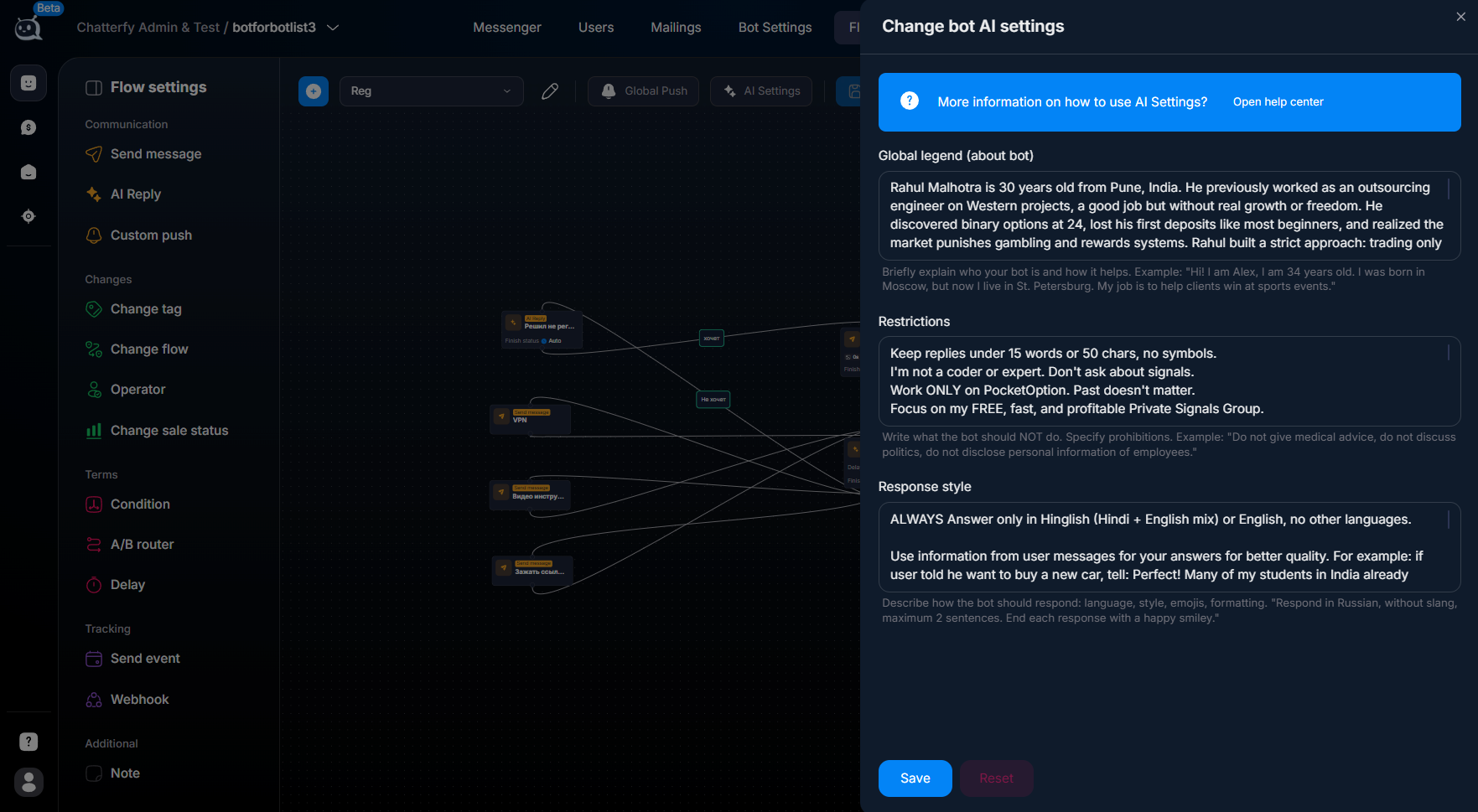
The Flow Settings → AI Settings section defines the bot's personality — the general context that AI takes into account in every response via the AI Reply step inside this flow. Three blocks: Global Le
The Flow Settings → AI Settings section defines the bot's personality — the general context that AI takes into account in every response via the
AI Reply step inside this flow. Three blocks: Global Legend (who the bot is, what it does, what role it has), Restrictions (what it must not say or do), Response Style (language, tone, length, emojis, formatting).These settings are at the flow level (not the bot level) — because different scenarios in one bot can have different roles. For example, one bot for traffic arbitrage: the main flow is an affiliate program manager who guides the lead to a deposit. The reactivation flow is a VIP assistant who gently brings dormant leads back. The same AI engine, different personalities, different tone.
These instructions are the strongest lever for AI quality. A good Global Legend + precise Restrictions + strict Response Style can pull a “weak” model up to an acceptable level. Vague prompts will ruin even the strongest model.
All three blocks must be in English
Global Legend, Restrictions, and Response Style must be written in English, even if the bot communicates with the lead in another language. This is a requirement of AI models — English provides better instruction comprehension quality (models are trained primarily on English corpora). The actual response style for the lead is set in Response Style: “Always answer in Russian” — and AI will answer in Russian. Other languages work the same way: “Spanish”, “Portuguese”, “German”, etc.
What’s inside


Global Legend — who the bot is, what it does, and what role it has in the dialogue. The most substantive description lives here. Length is usually 3–7 lines. Concise, no fluff.
Restrictions — what the bot must not say or do. Prohibitions + desired behavior “instead of” the prohibited one. Strict rules for topics the lead may bring up (legal, political, about competitors).
Response Style — language, tone, response length, use of emojis, formatting. This is the most sensitive to small changes. Experiment here, not in Legend.
Use cases by niche
Personality depends heavily on the niche. A few real-world examples to give you a starting point:
—Forex / crypto arbitrage: bot = “experienced trader-mentor”, confident tone, references to past cases, emphasis on quick registration and FD. Restrictions: do not give specific trading signals, do not promise profit.
—E-commerce: bot = “polite store manager”, friendly tone, focus on placing the order, answering questions about delivery and availability. Restrictions: do not discuss competitors, do not give discounts beyond the catalog.
—SaaS support: bot = “technical expert”, precise tone, suggests diagnostic steps, refers to the docs. Restrictions: do not give recommendations for third-party products.
—Info products: bot = “course curator”, supportive tone, motivates, answers about the program. Restrictions: do not promise individual work, do not comment on other people’s materials.
What AI takes into account when answering
When a lead sends an incoming message, AI processes three sources of instructions (by priority):
- AI Settings — global personality (this section).
- Conversation history — what was said earlier (the last N messages).
- AI Reply step settings (Goal, Requirements, Legend, Reply Addition).
Then it checks:
Whether the
Requirements are met (transition condition).Filling recommendations
— Put the most important rules higher in the text. AI gives more weight to the beginning of the prompt.
— State instructions briefly and specifically. AI follows “Reply in 16 words max” better than “be brief”.
— Add examples of the desired behavior. “If user asks about price → answer: "From $50".” This gives AI a wording template.
— Do not leave rules only as prohibitions. Specify what to do instead of the prohibited action. “Don't discuss competitors → instead say "We focus on our product".”
— Using
IMPORTANT: and ALWAYS / NEVER increases the priority of the rule. Apply this only to 2–3 truly critical rules; otherwise, it will stop working.Where to start
Global Legend — who is the bot— define who the bot is (name, role, niche, main goal in the conversation).
Restrictions — what the bot must not do— what must not be discussed, which topics are prohibited, and what to answer instead.
FAQ
Articles in this section
Related


Was this article helpful?