

Resource Usage
The Billing → Usage section is a summary of the company’s spending statistics. Unlike (where each charge is shown as a separate line), Usage shows aggregated spending from two perspectives: by bots an
The Billing → Usage section is a summary of the company’s spending statistics. Unlike Charge History (where each charge is shown as a separate line), Usage shows aggregated spending from two perspectives: by bots and by workspaces (Spaces).
This is where you understand not “how much was charged,” but “where the budget is going.” It is used for monthly reconciliation, reallocating resources between projects, and finding unexpectedly expensive bots.
When to open this section
Monthly reconciliation — which bot consumed how much during the period. Preparing a report for management or for a client who pays for several Spaces. Finding unexpectedly expensive conversations: one bot is taking 60% of the budget — is that normal, or is the prompt broken? Budget reallocation: move a bot from one Space to another and check whether the load has actually decreased. After launching a new campaign or AI feature — compare the increase in spending with your expectations.
How it works
A bot’s spending consists of two parts: platform billing for the bot itself (fixed) and AI chats — conversations where AI Reply, AI Routing, or AI Recognition was triggered. The more actively AI is used, the larger this part is.
If a bot moved from one Space to another in the middle of a period, spending for the remaining days goes to the new Space. The previous part remains assigned to the old one.
Usages by bots
Resource usage for each bot in the company.
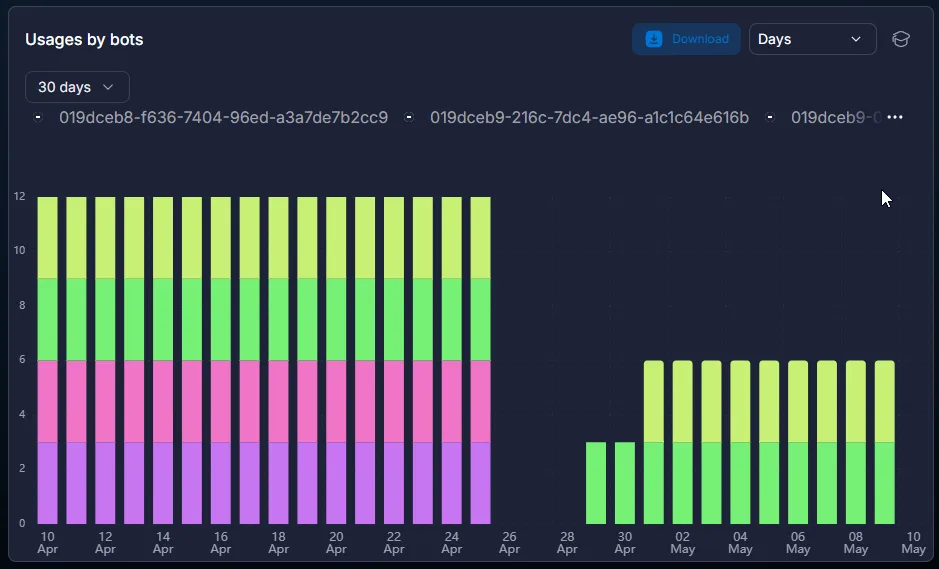
Here you can see how much each bot consumed during the selected period. This is useful when you have 5+ bots and it is not clear where the budget is concentrated.
A typical situation: you see that one bot is taking 5 times more than the others. Possible reasons: more incoming traffic (normal), AI is working more actively (normal if that is the goal), AI Reply is poorly configured and loops (check AI Reply — smart replies via AI), or an expensive model is connected in AI Models — Complete Guide to AI Models in Chatterfy for logic where a cheaper one would have been enough.
Usages by spaces
Resource usage by workspaces.
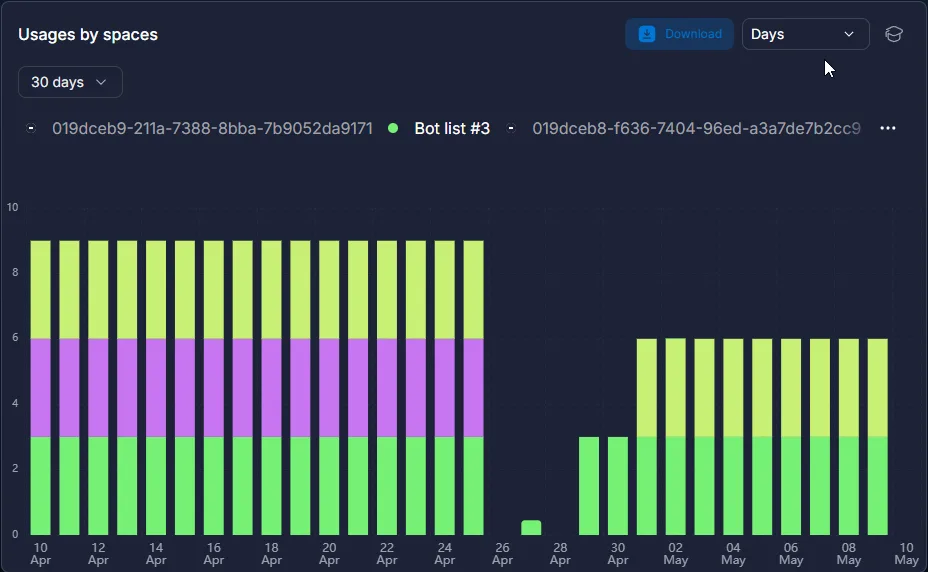
Helps analyze expenses by projects or clients. If each Space is a separate offer or client project, you immediately see how much each project costs and what to charge whom.
Especially useful for agencies: one Space — one client. The Space’s monthly spending equals the total platform invoice to the client.
Use cases
Find the bot that is eating the budget — arbitrage
The buyer launched 4 campaigns, each on its own bot. After a week, spending is 3 times higher than planned. They open Usage by bots → see that one of the 4 bots is taking 70%. They go to Steps Conversion — funnel by flow steps of this bot and discover that AI Reply got stuck in a loop at one step (Skip transition blocking on first run is disabled, and each lead sends 30 messages). They fix it — spending returns to normal.
Client reconciliation — sales agency
An agency manages CRM for several clients. Each client is a separate Space. At the end of the month, they open Usage by spaces, see the spending for each one, add their margin, and issue invoices. A dispute with a client about “where this amount came from” is resolved with a link to a screenshot of the section.
AI load analysis — support
The support team implemented AI for support bots. After a month, they check: AI handles 70% of conversations, spend increased by $200, and the workload for operators decreased by 15 hours per week. They calculate ROI: $200 < the cost of 15 operator hours.
What to keep in mind
Data in Usage is updated once a day — you will see today’s spend tomorrow. Do not expect real-time data. Bots with the Stop status are not billed, but they still appear in the list. For an archived bot, spend for previous periods is retained — this is financial history.
Frequently asked questions
Connection with other sections
Usage gives you a company-wide view — at the level of bots and Spaces. For details on a specific bot, open Billing — bot expenses — it shows spend by day, average conversation cost, trend charts, and average cost of a new chat.
If you need to understand which funnel step is where money is being spent — Steps Conversion — funnel by flow steps
Related


Was this article helpful?