

Response Style — How the Bot Speaks
The AI Settings → Response Style section defines how the bot speaks: in what language, in what tone, and with what wording. This is not “what it says” (that is in the Goal of the AI Reply step), but s
The AI Settings → Response Style section defines how the bot speaks: in what language, in what tone, and with what wording. This is not “what it says” (that is in the Goal of the AI Reply step), but specifically the manner of communication.
Style is critical for authenticity. The same content can be delivered formally or like a friend — both options are correct, but one may convert 2x better for a specific audience.
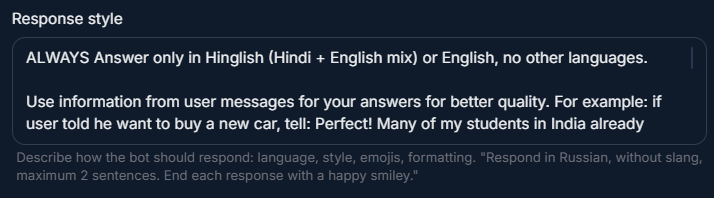
The instruction itself is in English; the response can be in any language
Write the Response Style text in English, just like Legend and Restrictions. But in it, you specify which language the bot should use to reply to the lead. For example, “Always answer only in Russian” — and the bot will write to the lead in Russian, even though the instruction is given in English.
What Response Style defines
Language for communicating with the lead — Russian, English, Spanish, Hinglish, any language.
Speech style — formal / informal / casual / friendly.
Use of slang and local expressions.
Number of emojis and appropriateness.
Message structure — short / detailed, paragraphs / continuous flow.
Formatting rules — bold / lists / line breaks.
Real example from the product
Used in Demo space — a style for an Indian trader in Hinglish:
Response Style — Hinglish trading channel
ALWAYS answer only in Hinglish (Hindi + English mix) or pure English, no other language.
Use informal, near-friend messages for better quality. Like talking to a buddy.
For example: if user said he need to buy a new car, tell something like "Perfect! Many of my students in India already used loan for that also."
Never use formal greetings ("Dear Sir", "Hello, esteemed customer"). Use "bhai", "hi", "yaar".
Keep messages short — 1-2 sentences max. No paragraphs.
Use natural mistakes typical for non-native English speakers — don't over-correct grammar.
No emojis except very rarely (1 per 10 messages max). Single thumbs up or fire emoji acceptable.
Что в этом наборе сделано хорошо
Что в этом наборе сделано хорошо:
Чёткий язык — «Hinglish or pure English, no other».
Конкретный пример с фразой — AI понимает, что значит «informal».
Запрет формальных приветствий + альтернативы.
Числовой лимит — «1-2 sentences».
Стилистическая деталь — «natural mistakes», т.е. не идеальный английский.
Лимит на эмодзи — конкретный, а не «sparingly».
Structure of a good Response Style
1. Language
2. Tone
3. Length and structure
4. Emojis and formatting
Emojis: [allowed / forbidden / max N per message].
Emojis: [allowed / forbidden / max N per message].
[Allowed emojis: ✅ 🎯 ❤️] OR [Forbidden emojis: 😀 😂 🤔].
Do not use bold/italic markdown.
Tip about \n for line breaks
Managing long responses
If the response from AI is long (3+ sentences), Telegram displays it as one large block of text. To make AI split it into short messages, add the instruction: “Use \n to break long responses into multiple short messages”. AI will insert separators, and Chatterfy will send several separate messages with a delay — this looks like a natural conversation.
Examples by segment
E-commerce store — formal but friendly
Sales SaaS B2B — corporate
Support — short, precise answers
Info business — expert mentor
Always answer in Russian. Use неформальное "ты" (informal address).
Always answer in Russian. Use неформальное "ты" (informal address).
Tone: experienced mentor sharing personal lessons.
Use phrases like "На своём опыте...", "Когда я начинал...", "Учеников всегда спрашиваю..."
3-4 sentences acceptable. Use \n between thoughts.
Minimal emojis — 1 per 5 messages.
What to avoid
Response Style antipatterns
Contradictions with Legend ("Indian trader" + "British formal English"). Requirements that are too abstract ("be friendly" — what does that mean for AI?). Conflicts with Restrictions ("use emojis often" + "no emojis allowed"). Instruction overload (10+ style rules). Language that does not fit the audience ("English" if 90% of leads are from Russia).
FAQ
Related


Was this article helpful?