

Charge History
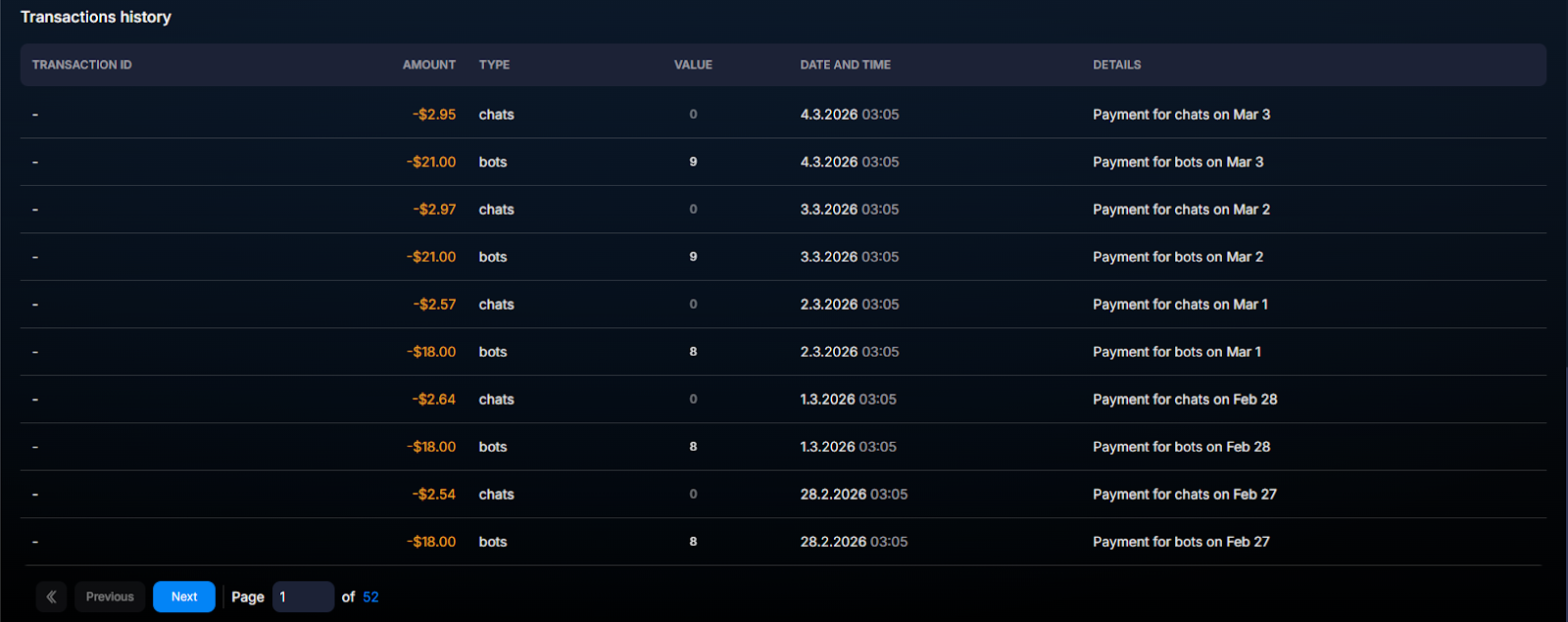
The Transactions history block in the Billing section lists all debits from the company account line by line. Unlike (where data is aggregated by bots and Spaces), here each debit is a separate record
The Transactions history block in the Billing section lists all debits from the company account line by line. Unlike Resource Usage (where data is aggregated by bots and Spaces), here each debit is a separate record with a type and quantity.
It is used for two tasks: to understand “where exactly the money went” and to find unexpected debits that need to be investigated.
When to open this page
Preparing an expense report for a period (accounting, invoicing clients). Looking for an unexpectedly large debit — if you notice that the balance dropped faster than usual, open this block and check the type. Reconciliation with Usage — total spend in Usage = sum of transactions in Transactions history for the same period. Audit after changing settings — if you changed the AI model or enabled AI Recognition, check the impact on cost.
How it works
Each record describes one type of debit for one day. If you have 5 bots, there will be 5 records with the
bots type (one per bot). If AI is active in the company, AI chats records will be added with the number of AI conversations.Records cannot be edited or deleted — this is financial history. They are stored indefinitely, as are top-ups.
What appears in the list
Three debit categories:
bots — the cost of running each active bot (fixed platform pricing). Bots with the Stop status are not charged.AI chats — the cost of AI processing for conversations: AI Reply, AI Routing, AI Recognition. Depends on the selected model and user activity.Table fields
Field | What it shows | Example |
|---|---|---|
Transaction ID | Unique operation identifier. | TX-2026-05-07-0042 |
Amount | Debit amount in USDT. | 1.50 |
Type | Operation type. | bots / AI chats |
Value | Number of bots or conversations in this record. | 1 (for bots), 23 (for AI chats) |
Date and time | When the charge was made (UTC). | 2026-05-07 00:00:00 |
Details | Additional information, link to a bot/Space. | Bot: my-trading-bot, Space: production |
Usage examples
Reconciling a monthly report
The accountant closes the month. Opens Transactions history for the month, filters by type —
bots separately, AI chats separately — totals them, reconciles them with the balance report. Downloads it to Excel for further analysis.Finding an unexpected charge
The Owner sees that $50 was spent yesterday instead of the expected $20. Opens Transactions history, sees several
AI chats entries with large Value. Goes to “Resource usage” Resource Usage — determines that one of the bots sharply increased spending → checks the AI settings for it.Impact of a new AI model
The sales team switched the AI Reply model to a higher-quality one. After 3 days, they compare Transactions history before and after — they see an increase in
AI chats. They conclude: quality improved, spending increased by 30%, conversion to a deal increased by 25% — it pays off.Charges are batched, not real-time
If you changed the bot settings today and want to check the effect, view Transactions history in 24 hours. Changes in charges will not appear earlier.
FAQ
Relationship with other sections
Transactions history is the detailed data source. For an aggregated view, Resource Usage. For trends over time, Billing — bot expenses (there are daily charts and average values there). To monitor the overall balance, use the main Billing page.
Related


Was this article helpful?