Skip to content
ChatterfyHelp Center
HomeGeneralCRMAI ManagerTrackerPlatformsFAQUpdate log
General
Billing
Billing — Company Balance and Expenses
How to top up a company
Top-up history
Charge History
Resource Usage
Company
Spaces
Logs
  1. General
  2. Billing
  3. Billing — Company Balance and Expenses

Billing — Company Balance and Expenses

The Billing section is for managing the company balance and controlling expenses within the platform. Here you top up the balance, view the transaction history, and analyze where the money is going. B

Updated June 21, 20261 min
The Billing section is for managing the company balance and controlling expenses within the platform. Here you top up the balance, view the transaction history, and analyze where the money is going.
Billing essentials
Settlements are only in USDT, on the TRC20 or ERC20 networks. The minimum top-up amount is $100. Charges are made once a day at 00:00 UTC. Access to the section is available only to the company Owner and Admin.


What’s inside

How to top up a company
How to top up a company Topping up the balance is a required step when creating a company. Without a balance, the company will not be activated. Payments are made in USDT, with a minimum of $100. Chat
Top-up history
The Deposits history block in the Billing section shows all your top-ups since the company was created. It is a financial ledger: records are never deleted or edited. It is used for three tasks: recon
Charge History
The Transactions history block in the Billing section lists all debits from the company account line by line. Unlike (where data is aggregated by bots and Spaces), here each debit is a separate record
Resource Usage
The Billing → Usage section is a summary of the company’s spending statistics. Unlike (where each charge is shown as a separate line), Usage shows aggregated spending from two perspectives: by bots an


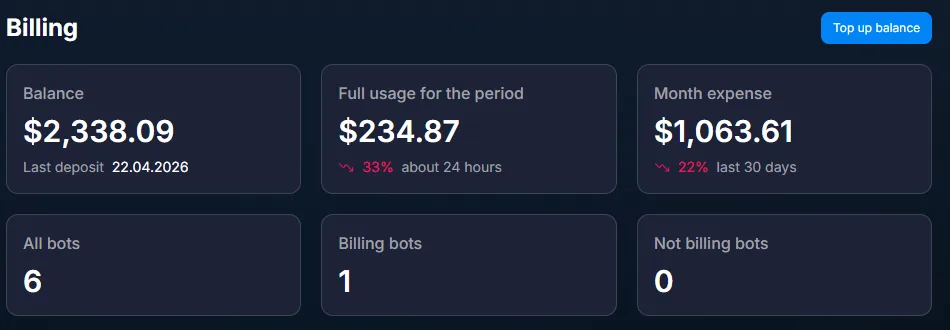
What’s at the top of the section

Above the list are the main billing metrics:
Balance — the company’s current balance.
Full usage for the period — expenses for the selected period.
Month expense — expenses for the last 30 days.
All bots / Billing bots / Not billing bots — the total number of bots and how many of them are included in billing.


Section articles

Top-up history
The Deposits history block in the Billing section shows all your top-ups since the company was created. It is a financial ledger: records are never deleted or edited. It is used for three tasks: recon
How to top up a company
How to top up a company Topping up the balance is a required step when creating a company. Without a balance, the company will not be activated. Payments are made in USDT, with a minimum of $100. Chat
Charge History
The Transactions history block in the Billing section lists all debits from the company account line by line. Unlike (where data is aggregated by bots and Spaces), here each debit is a separate record
Resource Usage
The Billing → Usage section is a summary of the company’s spending statistics. Unlike (where each charge is shown as a separate line), Usage shows aggregated spending from two perspectives: by bots an


Related

Administration (Company)
The Company section is about the company’s infrastructure. Not sales or advertising. Here you manage the team, projects, access permissions, and action control. In most cases, you only need to go here
Billing — bot expenses
The Billing tab in the shows how much it costs to run a specific bot. All expenses are collected here: using the bot itself, AI model calls, AI Reply, AI Routing, and AI Recognition. This section help
Glossary
In Chatterfy, the same object is sometimes called different things. Some people say lead , others say client or user . Some say flow , others say funnel . This glossary is the source of truth: the can

Was this article helpful?

NextКак пополнить компанию

On this page

  • What’s inside
  • What’s at the top of the section
  • Section articles
  • Related