Skip to content
ChatterfyHelp Center
HomeGeneralCRMAI ManagerTrackerPlatformsFAQUpdate log
FAQ
Tracker Errors
Telegram Errors
FAQs
Frequently Asked Questions
The bot stopped accepting channel join requests — why?
Do I have to keep my balance above $100?
AI takes a long time to respond / works slowly
Channel not visible when creating a channel campaign — how to fix it?
I imported a flow, but the bot is still following the old funnel
Why the AI Doesn't Skip a Step If the Lead Has Already Answered Appropriately
How to make the bot wait for a lead's reply
How to remove the keyboard (reply keyboard) for a lead
How do I restart a funnel for a lead?
Requirements for Uploading a Custom Landing Page
Uneven A/B testing — 90% to one branch, 10% to the other
Voice message without visualization (waveform)
Why conversations and events are not tracked — only Subscribe
How to Send a Round Video Message (Video Note) Correctly
How to avoid video compression when sending videos
How to hide chats between agents
  1. FAQ
  2. FAQs
  3. Channel not visible when creating a channel campaign — how to fix it?

Channel not visible when creating a channel campaign — how to fix it?

When creating a campaign with the To channel traffic flow type, Tracker prompts you to select a channel from the list. If the channel does not appear in the list, the reason is almost always one of tw

Updated August 30, 20262 min
When creating a campaign with the To channel traffic flow type, Tracker prompts you to select a channel from the list. If the channel does not appear in the list, the reason is almost always one of two things: the channel is already occupied by another handler, or the bot you want to use to receive requests has not been granted administrator rights.
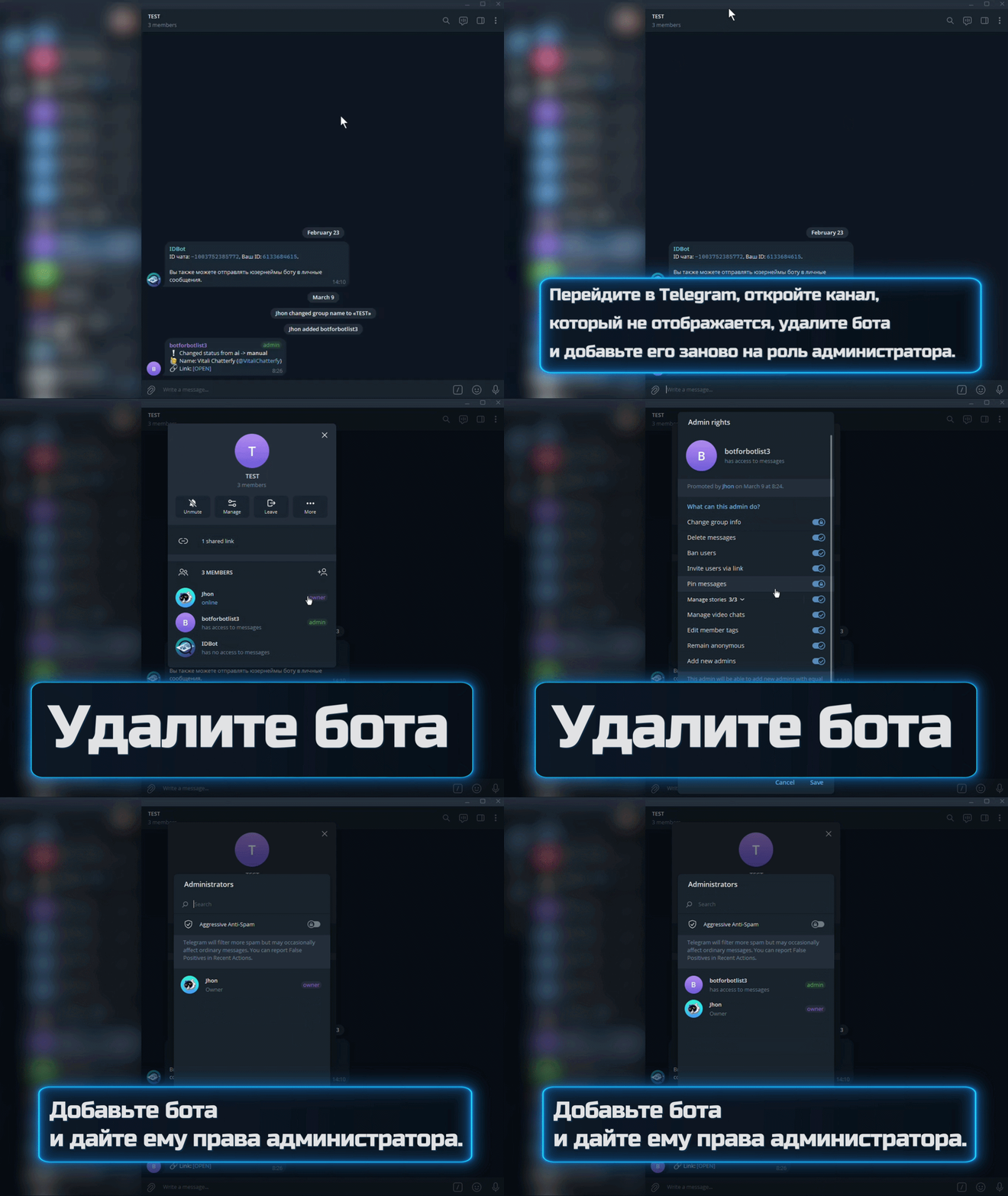
Solution: reconnecting the bot to the channel with administrator rights
Removing the bot from the channel and adding it again with Manage Subscribers rights


Why this happens

Telegram assigns channel request handling to one bot at a time. If the channel already has another Invite bot or a third-party service handling join requests, Chatterfy cannot connect, and the channel is not shown in the list.
The second reason is that the bot was added to the channel as a regular member or was granted an incomplete set of permissions. Without the Manage Subscribers permission (approving join requests), Telegram does not allow it to process join requests, and the channel is filtered out of the list.


How to fix it

  1. 1

    Check whether there are other bots in the channel

    Open the channel in Telegram → Manage Channel → Administrators. All added bots will be listed there. If there are third-party Invite services (BotHelp, ChatFuel, etc.) or another Chatterfy bot, remove them or revoke their Add Members / Manage Subscribers permission.
  2. 2

    Remove the bot from the channel

    In the channel admins, find your Invite bot and click Remove admin. Then remove it from the channel members completely. This resets all residual permissions for the request handler.
  3. 3

    Add the bot again with admin rights

    Add Admin → find the bot by @username → grant the minimum set of permissions: Add Members (approve requests) and Manage Subscribers. The Invite bot does not need any other permissions. Save the changes.
  4. 4

    Create the campaign again

    Open How to create a campaign and complete the wizard. The channel should now appear in the list. If it does not, refresh the page after 1–2 minutes; it may be cached.
To prevent this from happening again
Before adding the bot to a new channel, make sure the channel has no old request handlers. If the channel was created from scratch specifically for the campaign, there should be no issues. If the channel is being reused for a “second life” (there was another project there before), go through the admin list and clean it up.


FAQ

Wait 1–3 minutes after adding the bot with the required permissions, then refresh the page. Telegram applies new permissions with a delay. If the channel has not appeared after 5 minutes, check that the bot is activated in General — basic bot settings and that the bot type is Standard or Invite (Types of Bots in Chatterfy).

Only the Invite bot is added to the channel. The DM bot remains separate; it works in direct messages. Admin rights in the channel are required only for the Invite bot. Learn more — Invite + DM — Hybrid Scenario.

Yes. One Invite bot can handle requests in several channels at the same time. In each channel, it must be an admin with Manage Subscribers rights. Create a separate campaign for each channel.

No, the queue is stored on Telegram's side. After you add the bot again, it will start receiving new requests and gradually pick up those pending in the queue. Old requests may be dropped due to Telegram's timeout (about 7 days).


Related

The bot stopped accepting channel join requests — why?
The bot in the channel suddenly stopped accepting join requests for the channel, even though the settings were not changed. The reason is almost always the same: leads are coming through links that ar
How to create a campaign
Creating a new campaign in Tracker — a step-by-step flow through all form setup tabs. Result: a working campaign with ready-to-use links for the ad account. This guide takes you from an empty campaign
недоступна
Invite + DM — Hybrid Scenario
The hybrid “Invite + DM” scenario is a classic traffic arbitrage setup. The user clicks an ad, lands on a landing page, goes to a bait Telegram channel, submits a join request, Invite Bot approves it,
Types of Bots in Chatterfy
Chatterfy has 4 types of connection to Telegram. The choice depends on how you want to communicate with a lead — via a bot, via a channel, or via a personal account. The type determines which features

Was this article helpful?

BackAI takes a long time to respond / works slowlyNextI imported a flow, but the bot is still following the old funnel

On this page

  • Why this happens
  • How to fix it
  • FAQ
  • Related