Skip to content
ChatterfyHelp Center
HomeGeneralCRMAI ManagerTrackerPlatformsFAQUpdate log
FAQ
Tracker Errors
Telegram Errors
FAQs
Frequently Asked Questions
The bot stopped accepting channel join requests — why?
Do I have to keep my balance above $100?
AI takes a long time to respond / works slowly
Channel not visible when creating a channel campaign — how to fix it?
I imported a flow, but the bot is still following the old funnel
Why the AI Doesn't Skip a Step If the Lead Has Already Answered Appropriately
How to make the bot wait for a lead's reply
How to remove the keyboard (reply keyboard) for a lead
How do I restart a funnel for a lead?
Requirements for Uploading a Custom Landing Page
Uneven A/B testing — 90% to one branch, 10% to the other
Voice message without visualization (waveform)
Why conversations and events are not tracked — only Subscribe
How to Send a Round Video Message (Video Note) Correctly
How to avoid video compression when sending videos
How to hide chats between agents
  1. FAQ
  2. FAQs
  3. How do I restart a funnel for a lead?

How do I restart a funnel for a lead?

The lead taps /start and expects the funnel to start over — but the bot “continues” from where it stopped. This is intentional: the Telegram command /start does not reset the dialog state in Chatterfy

Updated August 30, 20262 min
The lead taps /start and expects the funnel to start over — but the bot “continues” from where it stopped. This is intentional: the Telegram command /start does not reset the dialog state in Chatterfy. For the lead to go through the flow from the first step, you need to manually clear the chat from the customer profile.
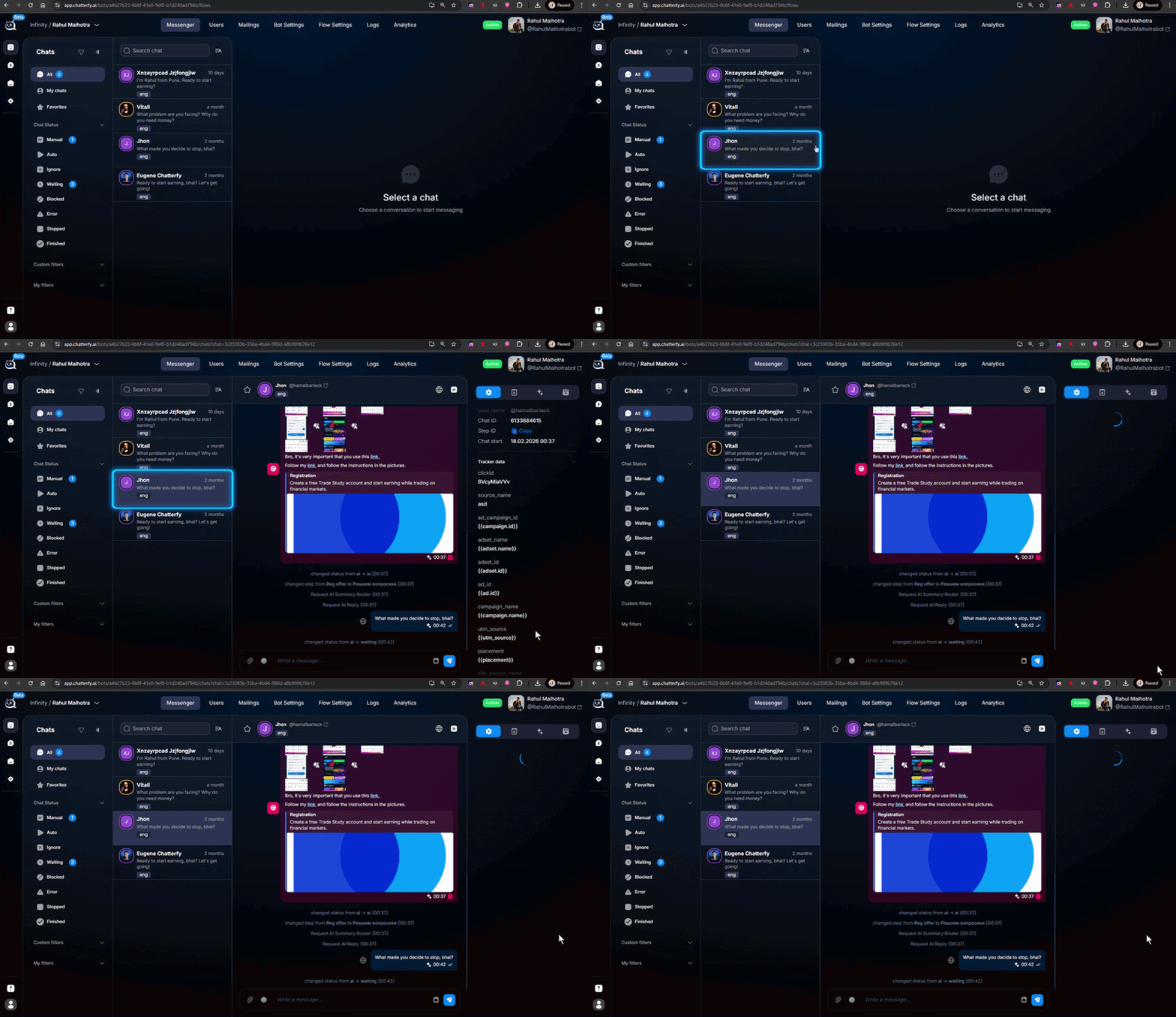
Clearing the dialog with Clear Chat in the customer profile
The Clear Chat button at the bottom of the customer profile in Messenger


Why /start does not restart the flow

The dialog state in Chatterfy is the lead’s position in the flow + the chat status + accumulated data (Custom Fields, tags, events). /start in Telegram is just a text command that the bot treats like a regular message. If you have not specifically configured /start to change the flow or reset the state, it will not do that.
This is done so an accidental /start (for example, if the lead opened the bot from another device) does not break the current conversation. In most scenarios, this is the correct behavior.


How to restart

  1. 1

    Open the customer profile

    In Messenger find the chat with the lead, click the name at the top, or open it in Customer Card.
  2. 2

    Click Clear Chat

    At the bottom of the customer profile, there is a Clear Chat button. Click it. This resets the dialog state: the position in the flow is reset, and the chat becomes “new.”
  3. 3

    The lead taps /start

    Now, when the lead taps /start (or simply sends any message), the bot will start the funnel from the first step. If the first step of the flow is not configured to start from any incoming message, ask the lead to tap /start specifically.
What Clear Chat does NOT delete
The conversation history in Messenger remains visible to the operator. Custom Fields, tags, and Tracker events are preserved (these are financial/CRM data, and they must not be lost accidentally). Only the lead’s link to the current flow step is removed.
When restarting is useful
Testing a funnel on your own test account — Clear Chat → /start, check the step → Clear Chat → /start again. Moving a lead from a cold offer to a new one. Restoring a scenario after manual operator intervention.


Frequently asked questions

Yes. In a flow, you can use the Change flow — transfer to another flow step — it moves the lead to any flow and any entry point. This is a “switch,” not a “restart,” but the effect is similar: the lead ends up on the required step without operator action.

In the first step of the flow, use Change flow — transfer to another flow with a transition to this same flow and the entry point set to the starting step. The trigger condition is message text = /start. Then any /start will force the lead back to the beginning.

When a lead clicks “Start bot” (after blocking), Telegram automatically sends the /start command. If the chat already had a state, it is preserved. If you want to start over when the lead returns, configure auto-reset on /start as described above.

Clear Chat does not move the lead between Spaces — they remain in the bot they were in. Moving a lead between bots/Spaces is not currently done manually; it requires an integration via webhook or a new flow.


Related

Customer Card
The client card is the right-hand panel in , which opens when you click a chat. It contains 3 tabs : Chat data (current lead parameters + actions), Events (event feed), Media (all files from the conve
Change flow — transfer to another flow
The Change flow step moves a lead from the current flow to another flow of the same bot. You can specify the exact step in the new flow where the dialog should continue. It is used to split the bot lo
Messenger
The Messenger section is the operator team's workspace within CRM . Here, you can view all bot or personal account dialogues, respond to leads, switch statuses, filter necessary chats, and open client

Was this article helpful?

BackHow to remove the keyboard (reply keyboard) for a leadNextRequirements for Uploading a Custom Landing Page

On this page

  • Why /start does not restart the flow
  • How to restart
  • Frequently asked questions
  • Related