

Leads — leads and events
Tracker → Leads is a section for viewing individual leads and their events. Here you can find a record by Click ID, filter the selection, and check the source, campaign, latest event, and funnel stage
Tracker → Leads is a section for viewing individual leads and their events. Here you can find a record by Click ID, filter the selection, and check the source, campaign, latest event, and funnel stages.
Lead — a click or visit
A record in the Tracker describes a click or a visit, not a unique person. Do not equate the number of records to the number of people.
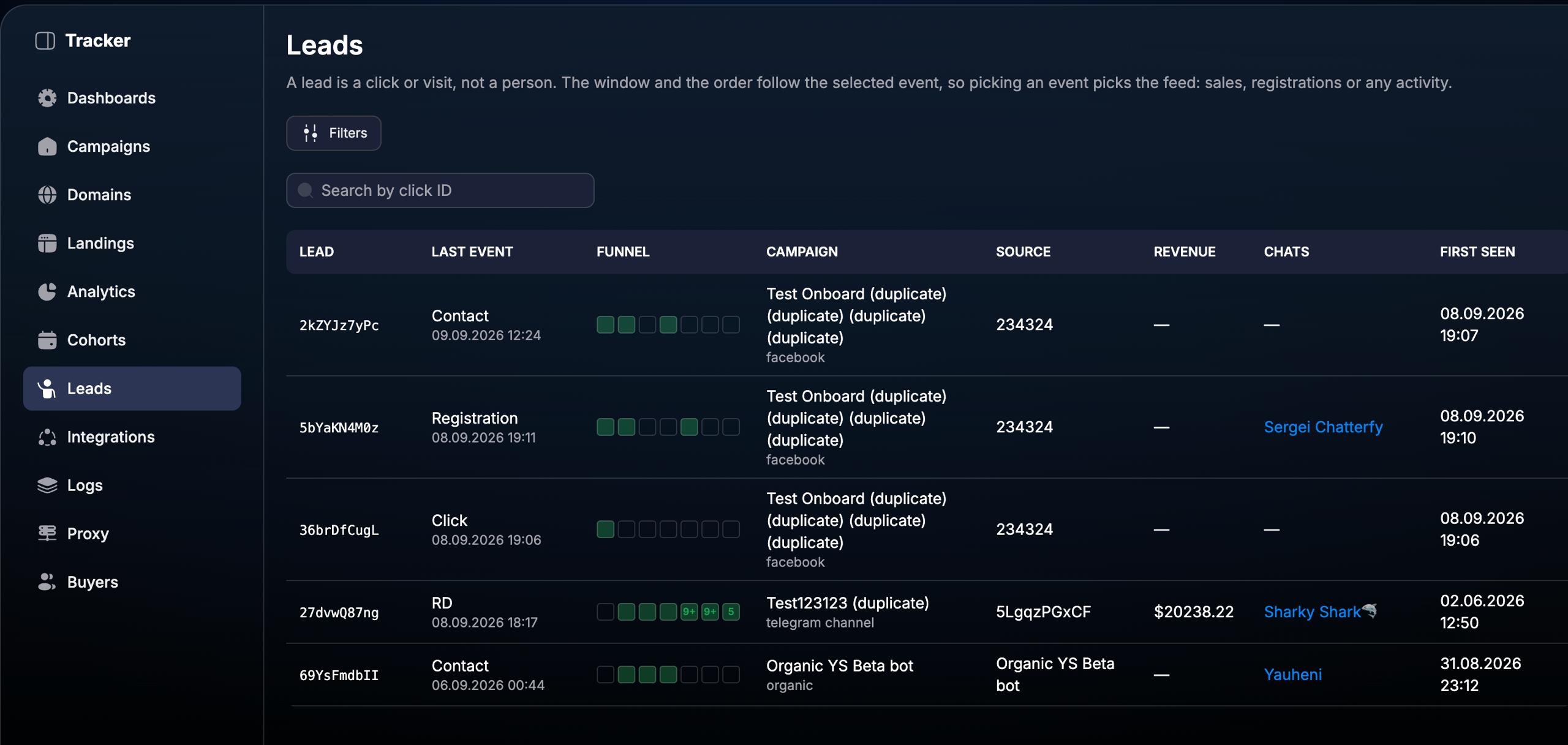
How to find a specific lead
1. Open the list
Go to Tracker → Leads.
2. Find the record
Enter the Click ID in the Search by click ID field if the lead identifier is known.
3. Limit the selection
Open Filters and select the necessary conditions. Consider the selected event and period.
4. Check the data
Compare the latest event, funnel stages, campaign, source, and record dates.
What data is available
Lead — the identifier of the lead record. Use the Click ID to find a specific click or visit.
Last event — the latest registered event and its date and time.
Funnel — a visual representation of the funnel stages and the registered activity of the lead.
Campaign — the campaign to which the lead belongs.
Source — the source specified for the record.
Revenue — the revenue displayed for the lead.
Chats — associated chats, if any.
First seen — date and time of the lead's first appearance.
The section helps to correlate the source and campaign with the events that occurred. When analyzing, use the record identifier so as not to confuse several different clicks or visits.
How event selection and filters work
The selected event determines the sample and order of records: you can view registrations, sales, or other activity. The window and sorting follow the selected event.
Therefore, First seen and the event date may differ: a lead could have first appeared earlier but performed the required action within the selected period. Check both dates when reconciling results.
Use Filters to narrow down the list for your task. If the expected record is not found, check the Click ID, the selected event, the period, and other sampling constraints.
Example of checking a registration
Find the lead by Click ID and check the campaign and source. Then, view the Funnel stages, the last event, and its date. Last event shows the most recent action, so another event might be displayed here after the registration.
To analyze how target actions occur in groups of leads over time, go to Cohorts. Leads is used for individual records, while Cohorts is for comparing groups.
FAQ
Why do First seen and the event date not match?
First seen refers to the lead's initial appearance, while the event date refers to a specific action. Time may pass between them.
Why is the registration not shown in Last event?
The column shows the last event. If another action occurred after the registration, it will be the one displayed as the latest.
How do I compare the conversion of different lead groups?
Use Cohorts: select the initial and target events, the entry period, and cohort parameters. Leads is useful for checking individual records that the analysis is based on.
Related article
Was this article helpful?