

Service Accounts — connecting and working with the API
Service Accounts are a way to connect an external system to the Chatterfy Partners API. In Company → Service Accounts, you create an integration account, assign it a role, and receive an API key. Then
Service Accounts are a way to connect an external system to the Chatterfy Partners API. In Company → Service Accounts, you create an integration account, assign it a role, and receive an API key. Then, you add the account to the required spaces and perform requests on its behalf. The service account determines who is accessing the API and which data is available to them; the key is used to authenticate each request.
This guide describes the entire connection path: account creation → access verification → company and bot selection → reading chats and messages → responding to the client. The following sections cover API methods, filters, exports, synchronization, object structure, and error handling.
1. Create a service account and grant access
Creation in Company
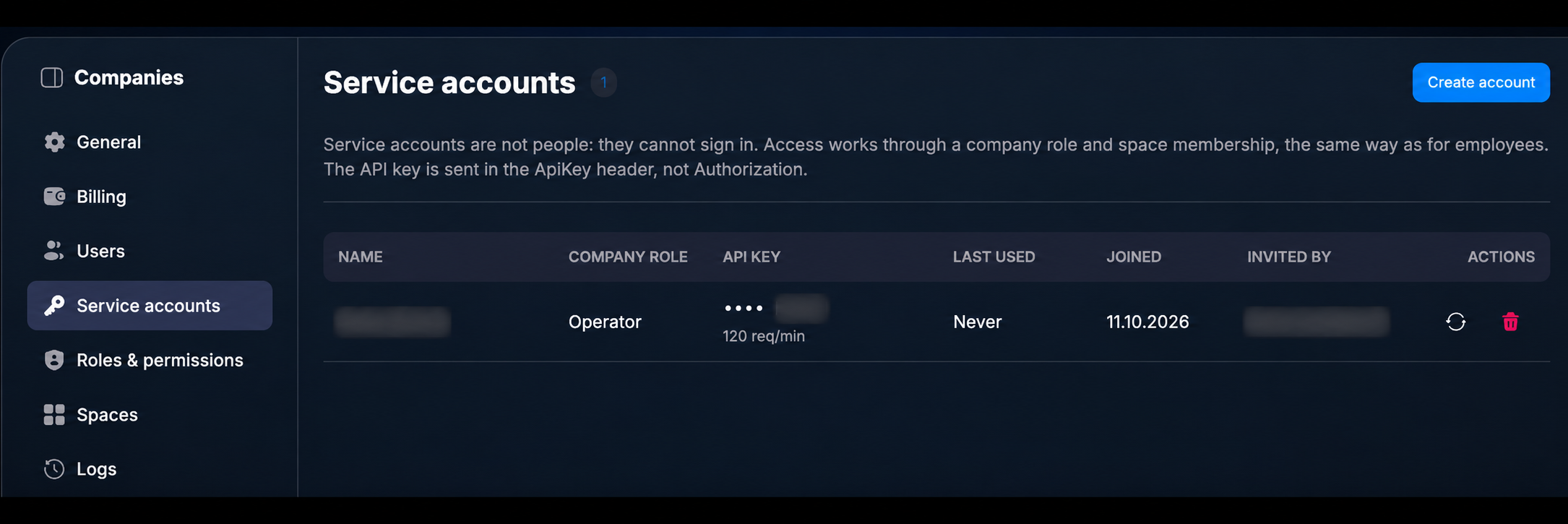
Open Company → Service Accounts and click Create account.
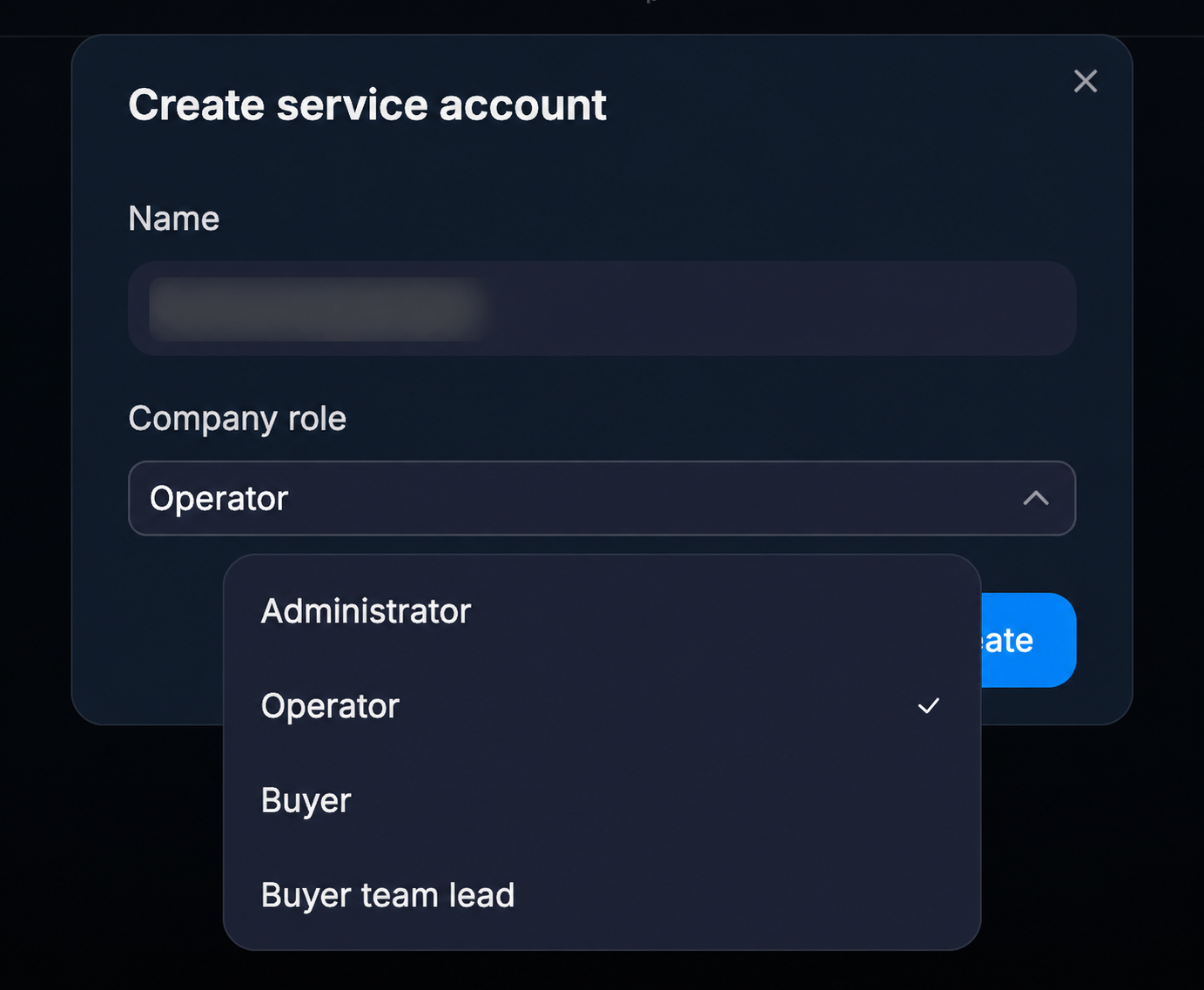
In the Name field, specify the name of the integration account, and in Company role, select a role. For example, reading chats and sending messages are different actions, so the role must contain the permissions necessary for your integration. Then click Create.
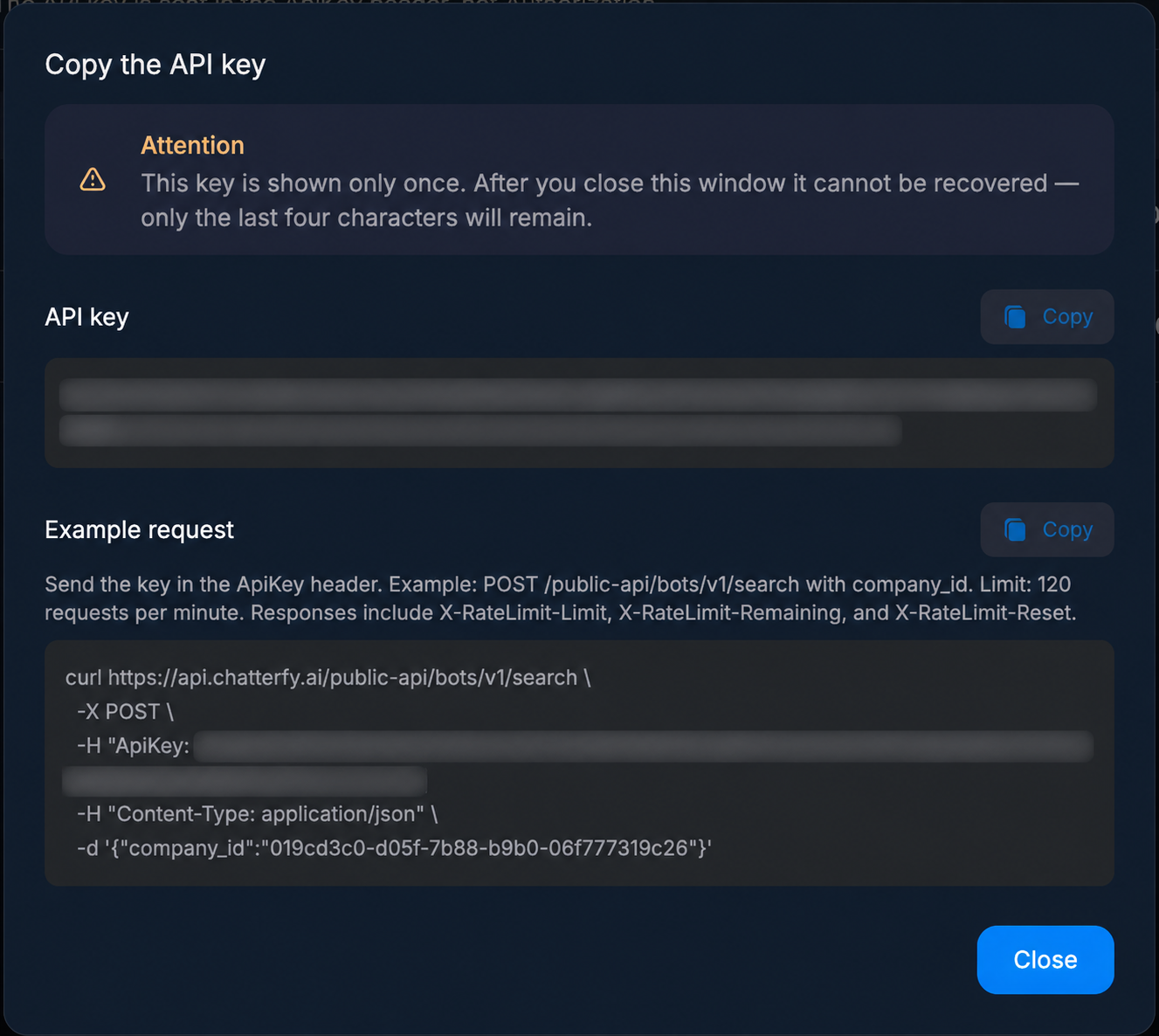
Saving the key and request example
Copy the full key immediately after creation: it is shown only once. Later in the interface, only the last four characters will be visible. You can also copy a request example here to use as a basis for your connection.
Access to spaces
Add the service account to the spaces that the integration needs to access via the API. To work with a bot and its chats, verify access to the bot's space and the permissions of the assigned role. The copied key alone does not grant access to all company data.
Rights are granted to the account in the Chatterfy interface. The API does not create users, change roles, send invitations, or manage billing. It allows you to read the list of participants and their roles, for example, to match an operator identifier with a name.
2. Pass the key and verify rights
API address and resource versions
Base address:
api-url.txtplaintext
https://api.chatterfy.ai/public-apiThe version is specified after the resource name: /chats/v1/search, /messages/v1/search, /bots/v1/{bot_id}. Resources are versioned independently: a new version for chats does not imply a mandatory transition to a new version for messages.
ApiKey header
In all requests, pass the key in the ApiKey header. Authorization: Bearer is not used for this API. Do not pass the key in the query string: the URL may be saved in logs and browser history.
headers.httphttp
ApiKey: YOUR_API_KEYYOUR_API_KEY in the examples represents your saved key, not a functional key. The key format is cfy_<environment>_<uuid>_<secret>. The header name case does not matter.
Each account has one active key. Issuing a new one immediately revokes the previous one, so update the key in all clients and processes using it after replacement. Permissions are tied to the account, not the key string.
Permissions and Scope
Permissions have names: chat.read, message.send, campaign.manage, and so on. Each action requires the corresponding permission.
A permission can be granted with a more narrow scope:
Scope | Coverage |
|---|---|
all | all records in its zone |
own | only those the account is assigned to: chats where it is the owner, campaigns where it is the buyer |
own_unassigned | same as above plus records with no assignment |
assigned | determined by the bot: resolves to one of the three above based on its assign_type |
If a permission's scope is restricted, the list contains only records accessible to the account. Requesting a specific record outside this scope returns a 404.
You do not need to figure out your permissions by brute force. Companies, spaces, and bots return an access map:
example.jsonjson
{
  "id": "019bff49-0a87-7fd5-8cf4-64f4e3a5b328",
  "name": "Acme",
  "status": "active",
  "access": { "chat.read": "own", "message.send": "all", "bot.read": "all" }
}
If a permission is not in the map, you do not have it. For a company, the map is the union of everything the account can do within it; for a space and a bot, it is the exact response.
The bot's assign_type field clarifies the assigned mode: all — the assigned owner does not limit visibility; assign_empty — your chats and unassigned chats are available; other values — only yours.
For Tracker, the access boundary is the company, not the space. A buyer account sees its own records; a buying team lead also sees their team's records. Therefore, the list of available campaigns may differ from the list of available bots.
3. Execute the first requests in order
All examples below use the same key. Replace YOUR_COMPANY_ID, YOUR_BOT_ID, and YOUR_CHAT_ID with identifiers from previous responses. Do not substitute object names in place of their IDs.
Step 1. Get available companies
Request the companies that the service account belongs to:
request.shbash
curl -X POST 'https://api.chatterfy.ai/public-api/companies/v1/search' \
  -H 'ApiKey: YOUR_API_KEY' \
  -H 'Content-Type: application/json' \
  -d '{}'
In the data array, select the required company. Save its ID as YOUR_COMPANY_ID. In access, you can see the union of the account's permissions within the company; check the access of the object itself for specific permissions for a space or bot.
Step 2. Retrieve company bots
request.shbash
curl -X POST 'https://api.chatterfy.ai/public-api/bots/v1/search' \
  -H 'ApiKey: YOUR_API_KEY' \
  -H 'Content-Type: application/json' \
  -d '{"company_id":"YOUR_COMPANY_ID","limit":50}'
Select a bot from data and save its id as YOUR_BOT_ID. The bot also returns space_id and access. If the required bot is not found, check the space, role, and access scope of your account. If necessary, retrieve spaces via POST /spaces/v1/search with company_id.
Step 3. Retrieve bot chats
request.shbash
curl -X POST 'https://api.chatterfy.ai/public-api/chats/v1/search' \
  -H 'ApiKey: YOUR_API_KEY' \
  -H 'Content-Type: application/json' \
  -d '{"bot_id":"YOUR_BOT_ID","limit":50}'
Select the required chat from data and save its id as YOUR_CHAT_ID. The search returns the latest dialogues at the top; for ordering, use sort with the value asc or desc. The chat contains contact data, status, assigned agent, tags, and associated lead data, if available to the account.
Step 4. Read chat messages
request.shbash
curl -X POST 'https://api.chatterfy.ai/public-api/messages/v1/search' \
  -H 'ApiKey: YOUR_API_KEY' \
  -H 'Content-Type: application/json' \
  -d '{"chat_id":"YOUR_CHAT_ID","limit":50}'
The data field contains messages and dialogue events. The type field distinguishes between message and event. For messages, the direction is defined by sender_type: incoming from the client, outcoming from your side. For message searches, the order is defined by the order field, not sort.
Step 5. Reply to the client
The next request sends a real message to the selected chat. Execute it after you have verified the chat_id and the response text. Sending requires message.send.
request.shbash
curl -X POST 'https://api.chatterfy.ai/public-api/messages/v1/send' \
  -H 'ApiKey: YOUR_API_KEY' \
  -H 'Content-Type: application/json' \
  -d '{"chat_id":"YOUR_CHAT_ID","content":"Hello! How can we help?"}'
Pass content, files, or both fields: an empty message is not accepted. The send response is a message object; its status can be waiting, ready, failed, or schedule. Check the status and error if the sending ended in an error. Save the identifier of the created message for subsequent reading or editing.
There are no idempotency keys yet. If the request times out, a retry may send the message twice — check the dialogue first.
4. Request and response format
Collections are read via POST /{resource}/v1/search with a JSON body, not via GET with a query string. The body contains the filter, page, and sorting, as well as the parent limiting the search: bot_id for chats, chat_id for messages, company_id for bots, spaces, campaigns, domains, and landing pages. The search can only narrow down what you are already authorized to access; it cannot expand it.
Sub-resources are available via the parent object's path: for example, bot tags, sources, and campaign parameters. Lists of such sub-resources are usually read via GET with limit and cursor in the query string. The composition of company and space members is requested via POST /companies/v1/{company_id}/members/search and POST /spaces/v1/{space_id}/members/search. The method for each call is specified in the tables below.
PATCH bodies are partial: send only the fields you are changing. An empty object is rejected with 400 no_fields so that a meaningless update does not move timestamps or trigger events. Unknown fields in the body are ignored, so new optional fields will not break your implementation.
Identifiers are UUIDs, except for lead and campaign source identifiers: these are short opaque strings, and you do not need to validate them against the UUID format. Time is RFC 3339 in UTC. A successful response is always 200, including object creation. Collections are returned in an envelope { "data": [...], "pagination": {...} }, single objects are returned as is, without a wrapper. Deletion returns {"id": "...", "deleted": true}.
The request body is limited to 64 KB, headers to 16 KB.
5. Pagination, downloading, and synchronization
Next page
Any search returns a page and a cursor:
example.jsonjson
{ "data": [], "pagination": { "has_more": true, "next_cursor": "b2Zmc2V0OjI1" } }Field | Type | Value |
|---|---|---|
has_more | boolean | whether there are more pages |
next_cursor | string | next page cursor; absent on the last page |
Copy next_cursor into the cursor field of the next request, leave everything else unchanged, and stop when has_more becomes false. The default limit is 25, with a maximum of 100. The cursor is opaque: do not parse or assemble it yourself.
Search depth and changing results
Standard search depth is limited to 10,000 entries. If exceeded, the API returns a 400 cursor_out_of_range error; the sum of the cursor position and limit is taken into account, so the error may occur on a page that crosses the limit. This is a search index limitation. To process larger volumes, split the selection by created_at and traverse the intervals separately or use chat export.
The results change while you are reading them. Chats are sorted by the time of the last message, so an active chat jumps to the top and shifts the others: the same chat may appear on two consecutive pages, while one that jumped over a read boundary may not appear at all. For most integrations, it is sufficient to aggregate results by id and skip duplicates.
Full chat export
For full exports, use POST /chats/v1/export. It reads a frozen snapshot of the selection, has no 10,000 entry limit, and a single chat will not be encountered twice or lost, regardless of how many messages arrive during the traversal. The body is the same as for search: bot_id, filter, sort, limit, cursor. The total number of chats in the export can be determined in advance via POST /chats/v1/stats with the same filter.
There is one important difference from search: the export cursor lives for five minutes. The snapshot is held for five minutes after each page; if you pause longer, the next request will return 400 cursor_expired, and the export will have to be restarted from the beginning without a cursor. Therefore, scroll continuously without delaying pages for later. Export requires the separate chat.export permission, and every execution is logged.
Regular synchronization
If you need regular synchronization—'what has changed since last time'—rather than a one-time export, it is more convenient to use an updated_at window in a standard search—sort in ascending order and move the lower bound:
example.jsonjson
{
  "bot_id": "019c61be-5ff7-70ca-8576-43950d877423",
  "limit": 100,
  "sort": "asc",
  "filter": {
    "field": "updated_at",
    "operator": "between",
    "value": ["2026-09-17T11:20:31Z", "2026-09-18T00:00:00Z"]
  }
}
Take the updated_at value of the last received chat as the lower bound for the next request and store the last timestamp between runs. A changed chat moves forward into the unread portion, so you might encounter it twice, but you will not skip over it. Specifically use 'between', not 'after': 'after' is strict, and two chats with the same timestamp at the intersection of pages would cause the second one to be missed.
6. Filtering chats
The same filter format is accepted by POST /chats/v1/search, POST /chats/v1/stats, and POST /chats/v1/realtime. The filter is passed in the filter field of the request body along with bot_id.
In the example, YOUR_TAG_ID_1, YOUR_TAG_ID_2, and YOUR_OPERATOR_ID must be replaced with real tag and operator UUIDs.
A filter is a tree. Nodes are of two types; they cannot be mixed in the same object:
• condition — field, and for all fields except query, operator and value;
• group — filters containing a list of child nodes and an optional logic field (default 'and', or 'or').
example.jsonjson
{
  "logic": "and",
  "filters": [
    { "field": "status", "operator": "is", "value": "manual" },
    { "field": "tags", "operator": "has_any", "value": ["YOUR_TAG_ID_1", "YOUR_TAG_ID_2"] },
    {
      "logic": "or",
      "filters": [
        { "field": "assign_id", "operator": "is_empty" },
        { "field": "assign_id", "operator": "is", "value": "YOUR_OPERATOR_ID" }
      ]
    }
  ]
}
The tree is limited to 64 nodes, a depth of 5, and one hundred values in a single condition. An unknown field, an unsupported operator for that field, or a value of the wrong type will result in a 400 error instead of executing incorrectly—this ensures a typo does not masquerade as a valid empty response.
Fields
Field | Type | Operators | Description |
|---|---|---|---|
query | text | operator not needed | substring by name, username, and external contact identifier; each word must be found in at least one of the three |
id | key | is, is_any, is_not | chat identifier |
external_id | key | is, is_any, is_not, is_not_empty | contact identifier in the source messenger |
status | key | is, is_any, is_not | chat status; besides actual values, it accepts the virtual ignore |
last_message_sender_type | key | is, is_any, is_not | who sent the last message: incoming or outcoming |
assign_id | key | is, is_any, is_not, is_empty, is_not_empty | responsible operator |
current_step_id | key | is, is_any, is_not, is_empty, is_not_empty | scenario step |
current_flow_id | key | is, is_any, is_not, is_empty, is_not_empty | scenario the step belongs to |
current_sale_stage_id | key | is, is_any, is_not, is_not_empty | sale stage |
tags | list of keys | has_any, has_all, has_only, has_none, is_not_empty | chat tags |
tracker_events | list of keys | has_any, has_all, has_none, is_not_empty | lead event types, for example purchase |
created_at | date | before, after, between | when the chat was created |
updated_at | date | before, after, between | timestamp of the last message; also used as a sorting key |
cost | number | more_number, less_number, more_equal_number, less_equal_number, equal_number, not_equal_number | money attributed to the lead for this chat |
incoming_unread_count | number | same as for cost | unread messages from the client; more_number with a value of 0 will keep only unread ones |
custom_fields | nested | is, is_not, is_any | custom field value; requires key with the UUID of the field definition, not its name |
tracker_fields | nested | is, is_not, is_any | lead tracker parameter, e.g., utm_source; requires key with the parameter name |
Operators
Operator | Value | Meaning |
|---|---|---|
is / is_not | scalar | equal / not equal |
is_any | array | equals any of the listed |
is_empty / is_not_empty | not required | field is empty / filled |
has_any | array | the list contains at least one of the values |
has_all | array | contains all listed, potentially others as well |
has_only | array | contains exactly these and nothing more |
has_none | array | does not contain any of them |
before / after | date | strictly before / strictly after |
between | two dates | falls within a closed interval |
more_number, less_number, more_equal_number, less_equal_number, equal_number, not_equal_number | number | standard numeric comparisons |
Dates are written as RFC 3339 (2026-08-01T00:00:00Z) or as a calendar day (2026-08-01). For a date condition, you can specify an IANA timezone name — it affects how the calendar day is expanded:
example.jsonjson
{ "field": "created_at", "operator": "between", "value": ["2026-08-01", "2026-08-31"], "timezone": "Europe/Warsaw" }Examples of nested fields:
example.jsonjson
{ "field": "custom_fields", "key": "019c61be-5ff7-70ca-8576-43950d877423", "operator": "is", "value": "VIP" }
{ "field": "tracker_fields", "key": "utm_source", "operator": "is_any", "value": ["google", "bing"] }
Important notes
Search reads an index populated by chat events. A chat in which nothing has happened may be absent from it, and a change made a second ago may appear with a slight delay. When you need the reliable state of a single chat, read GET /chats/v1/{chat_id} — it goes directly to the messenger.
The ignore status is virtual: it expands to "manual status and the last message is incoming." Therefore, it overlaps with manual, and it is not included in the total statistics response.
The filter is always applied on top of your permissions, not instead of them. If the chat.read permission is granted with a limited scope, a constraint by the assigned person is silently added to your condition: the filter can narrow the selection, but not expand it.
7. API methods by resource
The prefix https://api.chatterfy.ai/public-api is omitted in the tables.
Bots
Method and path | Action and parameters |
|---|---|
POST /bots/v1/search | bots of one company; body: company_id, status, type, query, limit, cursor |
GET /bots/v1/{bot_id} | one bot along with its access map |
PATCH /bots/v1/{bot_id} | name, description, status, timezone, image_url |
GET /bots/v1/{bot_id}/tags | bot tag reference |
POST /bots/v1/{bot_id}/tags | create tag: name, color in #1A2B3C format |
DELETE /bots/v1/{bot_id}/tags/{tag_id} | delete tag and remove it from all chats |
GET /bots/v1/{bot_id}/custom-fields | custom field definitions |
query in bot search — case-insensitive substring of the name.
Chats
Method and path | Action and parameters |
|---|---|
POST /chats/v1/search | body: bot_id, filter, sort (asc/desc), limit, cursor |
POST /chats/v1/stats | same bot_id and filter, response — counts by status |
POST /chats/v1/export | full export by filter: no depth limit, no duplicates or gaps; cursor lasts for five minutes; chat.export permission required |
GET /chats/v1/{chat_id} | entire chat |
PATCH /chats/v1/{chat_id} | status, assign_id, tags ({"assign": [...], "remove": [...]}), custom_fields |
DELETE /chats/v1/{chat_id} | deletes the chat along with its messages |
When modifying a chat, all identifiers are checked to ensure they belong to the same bot: a foreign tag, a foreign custom field, or a user not from the bot's space will be rejected with a 400 error.
Messages
Method and path | Action and parameters |
|---|---|
POST /messages/v1/search | body: chat_id, type (message/event), order (asc/desc), limit, cursor |
POST /messages/v1/send | body: chat_id, content, files, reply_message_id, meta, schedule |
GET /messages/v1/{message_id} | single message |
PATCH /messages/v1/{message_id} | content |
DELETE /messages/v1/{message_id} | delete |
In send you must pass content, files, or both — an empty message is rejected. Files are passed via a link ({"type": "photo", "url": "https://...", "meta": {}}), the endpoint does not accept uploads. schedule is the future time when the message should be sent. reply_message_id must point to a message from the same chat.
Message pagination is built on a messenger cursor rather than an offset: unlike chats, the cursor here comes from the message storage and does not encode a position in the results.
Spaces and companies
Method and path | Action and parameters |
|---|---|
POST /spaces/v1/search | body: company_id, limit, cursor |
POST /spaces/v1 | create a space: company_id, name, description; the service account becomes the owner |
GET /spaces/v1/{space_id} | space |
PATCH /spaces/v1/{space_id} | name, description |
DELETE /spaces/v1/{space_id} | responds with 409 space_not_empty while bots are in the space |
POST /spaces/v1/{space_id}/members/search | space members |
POST /companies/v1/search | in which companies is the key present |
GET /companies/v1/{company_id} | company |
PATCH /companies/v1/{company_id} | name only |
POST /companies/v1/{company_id}/members/search | company membership |
Member lists are read-only. If you do not have permission to view the composition, you will receive only your own record instead of an error — this is useful for checking who you are.
Analytics
GET /analytics/v1/bots/{bot_id}/chats/new, /chats/active, /chats/summary, /operators/messages, /operators/chats, /operators/events, /operators/messages-per-chat, /operators/events-per-chat, /operators/reply-time.
Query string parameters: from and to in RFC 3339 (required, period no longer than 366 days), timezone (IANA, defaults to UTC). For series by operator, use group_by (day or hour) and operator_id to filter for a single operator. Interval boundaries are calculated based on local midnight in the provided timezone. chats/summary defines its own periods and accepts only timezone.
reply-time is the median in seconds between an incoming message and a human response to it; dialogues that are never responded to are not included in the median.
Tracker
Method and path | Action and parameters |
|---|---|
POST /campaigns/v1/search | body: company_id, status, target_type, query, bot_id, limit, cursor |
GET /campaigns/v1/{campaign_id} | campaign with sources, parameters, bots, and buyers |
PATCH /campaigns/v1/{campaign_id} | name, description, status |
GET /campaigns/v1/{campaign_id}/sources | campaign sources |
GET /campaigns/v1/{campaign_id}/params | campaign parameters |
POST /campaigns/v1/{campaign_id}/params | add parameter: name, key, placeholder |
DELETE /campaigns/v1/{campaign_id}/params/{param_id} | delete parameter |
POST /domains/v1/search | body: company_id, limit, cursor |
POST /domains/v1 | add domain: company_id, link |
GET /domains/v1/{domain_id} · PATCH /domains/v1/{domain_id} · DELETE /domains/v1/{domain_id} | domain; changing the link returns it to a pending state |
POST /landings/v1/search | body: company_id, limit, cursor |
GET /landings/v1/{landing_id} | landing |
GET /leads/v1/{lead_id} | lead with parameters and events |
The tenant boundary in the tracker is a company, not a space. Within a company, an account assigned as a buyer only sees their own records, while a team lead of buyers also sees their team members' records.
Credentials and code are never exposed: proxy logins and passwords, integration configurations, pixel tokens and conversion identifiers, landing CSS and JS. Corresponding fields are not present in any response. Campaign creation is also not available: a working campaign requires links to scenario and messenger entities, which this API cannot verify the ownership of.
8. What the API returns
Fields marked as optional may be missing from the response entirely — do not rely on receiving null.
Bot
Field | Type | Description |
|---|---|---|
id | uuid | bot identifier |
name | string | name |
description | string | description |
type | string | bot type, for example telegram bot |
space_id | uuid | space the bot belongs to |
username | string | username in the source messenger |
status | string | active or stopped |
tags | array<uuid> | bot tag identifiers |
image_url | string | avatar |
timezone | string | IANA timezone of the bot |
assign_type | string | assignment mode: all — the agent does not limit visibility, assign_empty — own and unassigned chats are visible, otherwise — only own |
created_at | date-time | when created |
activity_at | date-time | last activity |
access | object | permission → scope map for this bot |
Chat
Field | Type | Description |
|---|---|---|
id | uuid | chat identifier |
bot_id | uuid | the bot that owns the chat |
name | string | contact name; truncated if the chat.contacts.read permission is missing |
username | string | contact username; empty if the chat.contacts.read permission is missing |
external_id | string | contact identifier in the source messenger; truncated if the chat.contacts.read permission is missing |
image_url | string | contact avatar |
status | string | manual, ai, blocked, start; ignore and stopped are also accepted for writing, while ignore is virtual in filters |
assign_id | uuid, optional | assigned operator |
tags | array<uuid> | tags on the chat |
custom_fields | array<object> | custom field values: id, key (definition uuid), value |
current_step_id | uuid, opt. | the scenario step where the chat is currently located |
sale_stage_id | uuid, opt. | sale stage; read-only |
last_message_id | uuid, opt. | identifier of the last message |
last_message | object, opt. | the entire last message object itself |
read_state | object, opt. | read status, see below |
lead_id | string, opt. | lead if the chat originated from tracked traffic |
lead | object, opt. | the entire lead object itself |
created_at | date-time | creation timestamp |
read_state contains incoming_read_message_id, incoming_unread_count, outcoming_read_message_id, outcoming_unread_count. Incoming messages are those from the client that have not yet been read by our side.
Message
Field | Type | Description |
|---|---|---|
id | uuid | identifier |
chat_id | uuid | chat |
type | string | message — standard message, event — system event such as a tag or status change |
status | string | waiting, ready, failed, schedule |
content | string | text |
sender_type | string | incoming — from the client, outcoming — from us |
sender | uuid, opt. | sender operator; empty if sent by a bot or if it is an incoming message |
external_id | string, opt. | identifier of the message in the source messenger |
error | string, opt. | reason, if status is failed |
pinned | boolean | is it pinned |
read | boolean | is it read |
is_mailing | boolean | was it sent as a broadcast |
reply_message_id | uuid, opt. | the message being replied to |
meta | object, opt. | custom data attached during sending |
files | array<object> | attachments: id, type, url, status, meta, created_at |
created_at | date-time | when created |
published_at | date-time | when sent to the messenger |
edited_at | date-time, opt. | when edited |
Attachment types: photo, video, audio, voice, document, sticker, animation.
Lead
Field | Type | Description |
|---|---|---|
id | string | short opaque identifier, not UUID |
company_id | uuid | company |
campaign_id | string, opt. | campaign that brought the lead |
source_id | string, opt. | source within the campaign |
type | string | lead type |
provider_type | string, opt. | advertising system |
provider_click_id | string, opt. | click identifier on the advertising system side |
params | object | transition parameters: IP, useragent, UTM tags, and other link parameters |
events | array<object> | lead events: event (e.g., purchase) and cost with cost and currency fields |
created_at | date-time | creation time |
Space, company, members
Object | Fields |
|---|---|
Space | id, company_id, name, description, access |
Company | id, name, status, access |
Space member | id, first_name, last_name, email, avatar_url, role_id, role_name, joined_at |
Company member | same as above plus account_type, where service denotes a service account |
Bot tags and custom fields
Object | Fields |
|---|---|
Tag | id, bot_id, name, color, created_at |
Custom field | id, bot_id, key, name, type, options, index, visibility, created_at |
The key of a custom field is the UUID of its definition; it is this key that is used both in chat values and in the custom_fields filter.
Tracker
Object | Fields |
|---|---|
Campaign | id, company_id, name, description, status, target_type, domain_id, landing_id, created_at, bots, buyers, params, sources |
Campaign bot | bot_id, type, start_step_id |
Source | id, name, provider, invite, created_at |
Parameter | id, campaign_id, key, name, placeholder, created_at |
Buyer | buyer_id, role, team_lead_id |
Domain | id, company_id, link, status, buyers, created_at |
Landing page | id, company_id, name, title, description, type, avatar_url, download_text, open_text, members_text, members_count, buyers, created_at |
The campaign target_type is telegram bot, telegram channel, or organic. A domain becomes operational when its DNS is pointed to the platform; until then, it is in a not-ready status. The campaign parameter key is the name of the parameter in the link that subsequently settles in the lead's params.
Analytics
Chat series return points with date and value fields. Operator series return points with date, operator_id, and value. The summary for new chats returns six numbers: today, yesterday, week, last_week, month, last_month.
Chat statistics by status: statuses is an array of status/count pairs, plus total. The virtual status ignore is not included in total because it overlaps with manual.
Subscription to updates
channel, ws_url, connection_token, expires_in_seconds, and for a single chat subscription, also a subscription_token.
9. Real-time updates
Instead of polling the active bot in a loop, subscribe to the channel.
POST /chats/v1/realtime — a feed of all bot chats matching the filter. The body is the same as for search: bot_id and filter. Events contain one chat and the change type: bump, upsert, remove, or stale.
POST /chats/v1/{chat_id}/realtime — details of a single dialogue, including information not found in the list, such as a change in message delivery status. Events arrive with type event and a payload_type field that identifies the change. This channel is shared by all observers, so the response includes an additional subscription_token, which must be provided when subscribing.
Both endpoints return channel coordinates rather than the events themselves: connect via ws_url using the connection_token and subscribe to the channel. The subscription lasts for expires_in_seconds seconds and is renewed by repeating the same endpoint call with the same body.
If realtime is not configured in the environment, both endpoints respond with 503 realtime_unavailable, while everything else continues to function.
Connection procedure
1. Call POST /chats/v1/realtime with bot_id and the required filter, or POST /chats/v1/{chat_id}/realtime for a single dialogue. The HTTP request itself is authenticated via the ApiKey header.
2. From the response, take the ws_url, connection_token, channel, and expires_in_seconds. For a single dialogue, also save the subscription_token.
3. Connect to the ws_url with the connection_token and subscribe to the channel; for a single dialogue, pass the subscription_token when subscribing.
4. Process the events for the required channel. To renew, repeat the initial HTTP request with the same body and use the updated subscription parameters.
Do not substitute the API key for the connection_token or subscription_token: these are different values with different purposes.
10. Errors and rate limits
All errors have the same response structure:
example.jsonjson
{
  "error": {
    "type": "invalid_request_error",
    "code": "invalid_limit",
    "message": "limit must not exceed 100",
    "request_id": "req_19b1e1109b0d37e463f571b01c2b5eba"
  }
}
type — one of invalid_request_error, authentication_error, permission_error, not_found_error, conflict_error, rate_limit_error, api_error. code — a reason code for programmatic handling, message — a text explanation that can be shown in logs but should not be parsed.
Code | When |
|---|---|
400 | malformed request: corrupted UUID, invalid enum value, empty PATCH, broken cursor, invalid filter, body larger than 64 KB |
401 | key is missing, corrupted, or revoked |
403 | account does not have the permission required by this call |
404 | the object does not exist, belongs to another company, or falls outside the scope of your permissions |
409 | state does not allow the operation: e.g., deleting a space that still contains bots |
429 | request limit exceeded, see Retry-After |
503 | dependency unavailable or realtime not configured |
Common code values: missing_api_key, invalid_api_key, access_denied, invalid_limit, invalid_cursor, cursor_out_of_range, cursor_expired, no_fields, empty_body, body_too_large, validation_failed, invalid_filter, rate_limit_exceeded, realtime_unavailable, service_unavailable, as well as <object>_not_found types like chat_not_found or campaign_not_found.
Accessing another company's data returns a 404, not a 403: a 403 would confirm that the identifier exists somewhere.
Every response, successful or not, includes the X-Request-Id header; in case of an error, it is also duplicated in the request_id field of the envelope. Include this in your support tickets to ensure the call is located in the logs as quickly as possible.
Request limit
The default key is allowed 120 requests per minute, calculated using a sliding window.
Header | Value |
|---|---|
X-RateLimit-Limit | requests allowed in the window |
X-RateLimit-Remaining | amount remaining |
X-RateLimit-Reset | unix-time for the end of the current window |
Retry-After | only with 429, seconds until the next attempt |
The limit is shared across all endpoints and processes using this key. Upon receiving a 429 response, wait for the duration specified in Retry-After before retrying the request.
11. Current Version Limitations
HTTP webhooks are not yet supported: WebSocket channels are used for live updates. There are no idempotency keys—re-sending after a timeout may create duplicate messages. There is no test environment or file upload endpoint: attachments are sent via links.
The API does not create users, assign roles, send invitations, or manage billing. However, methods for changing company names and creating or modifying spaces are described above: the limitations on user management do not mean all resources are read-only.
Campaign creation via API is not yet available. Tracker responses do not contain proxy logins and passwords, integration configurations, pixel tokens, conversion IDs, or landing page CSS and JS.
FAQ
Account created, but necessary data is not visible
Check the company, the account's access to the required bot's space, and that bot's access map. Permissions may be limited to your own or unassigned records. Search parameters do not expand rights. Tracker respects company access and assignments as a buyer or team lead.
The search does not show a chat that exists in the interface
Search works based on an event index: inactive chats may be absent, and recent changes may appear with a delay. For the reliable state of a known chat, use GET /chats/v1/{chat_id}.
I need the entire database of chats without gaps
Use POST /chats/v1/export with the chat.export permission. Regular search pagination works with changing results and is limited to a depth of 10,000 records. Read export pages sequentially: a pause of more than five minutes invalidates the cursor.
The full key is lost
It cannot be viewed again. Issue a new key in the interface and replace it in your integration. The previous key is revoked immediately.
Was this article helpful?